Configure GitHub OAuth
Create a GitHub OAuth App, configure local and production callback URLs, and connect its Client ID and Client Secret to Saavo.
Saavo already implements GitHub sign-in. Register an OAuth App with GitHub and configure its callback URL and two credentials. You do not need to write authorization, callback, or user profile retrieval code.
Once configured, the sign-in and sign-up pages automatically show a GitHub option. During authorization, the template requests read:user and user:email to read the user's GitHub profile and email addresses. It does not request repository permissions.
Choose URLs before you begin
After authorization, GitHub needs to return the user to Saavo's GitHub callback endpoint. The default path is in config/deploy.ts:
ui: {
    oauthRedirectTo: {
        github: '/api/auth/oauth2/github',
        google: '/api/auth/oauth2/google',
    },
},
The callback URL combines the site origin and callback path. For this example project:
| Environment | Site origin | Authorization callback URL |
|---|---|---|
| Local | http://127.0.0.1:5173 | http://127.0.0.1:5173/api/auth/oauth2/github |
| Initial deployment | The workers.dev address shown in the terminal | https://<your-workers-dev-domain>/api/auth/oauth2/github |
| Production domain | https://webpagetopdf.dev | https://webpagetopdf.dev/api/auth/oauth2/github |
Run npm run dev first and use the address actually shown in the terminal. If the port is not 5173, update the callback URL's port as well. In production, use VITE_SITE_URL from .env.production.
Callback URLs do not include a locale path
Do not add locale paths such as /zh-Hans or /en, or a trailing /. The template uses the fixed path /api/auth/oauth2/github.
Create a GitHub OAuth App
Open OAuth Apps
Sign in to GitHub, click your avatar in the upper-right corner, and open Settings → Developer settings → OAuth Apps. Click New OAuth App. For your first app, the button may say Register a new application.
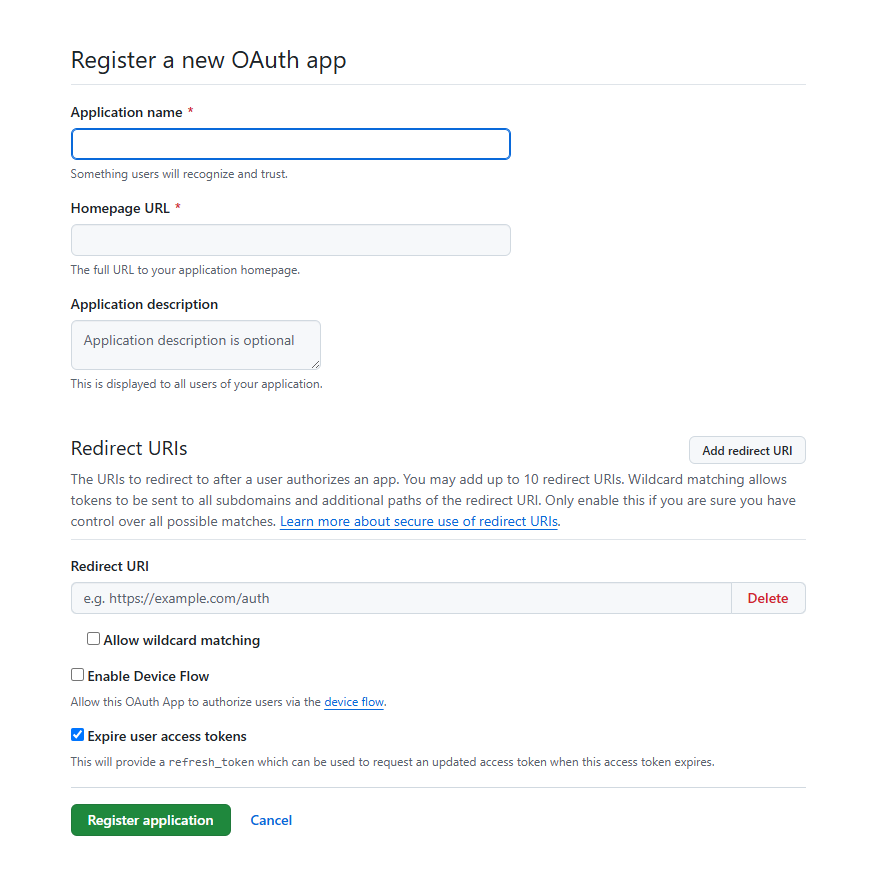
For a team project, you can create the app under a GitHub Organization where you have administrative access, so it does not remain tied to one member's personal account. For a personal project, create it under your own account.
Enter application details
Use these values:
| GitHub field | Local development example | Production example |
|---|---|---|
| Application name | WebpageToPDF Local | WebpageToPDF |
| Homepage URL | http://127.0.0.1:5173 | https://webpagetopdf.dev |
| Application description | Optional, briefly describe its purpose | Optional, briefly describe its purpose |
| Authorization callback URL | http://127.0.0.1:5173/api/auth/oauth2/github | https://webpagetopdf.dev/api/auth/oauth2/github |
GitHub currently allows multiple callback URLs for one OAuth App. For a personal project, you can create one app and use Add callback URL to include local, workers.dev, and production-domain URLs. Teams with stricter environment isolation requirements can create separate development and production apps so each environment uses a different Client Secret.
You do not need to enable Device Flow. Saavo uses the web authorization code flow, with the browser returning to the callback endpoint after sign-in.
Register the app and save credentials
Click Register application to open the app details page.
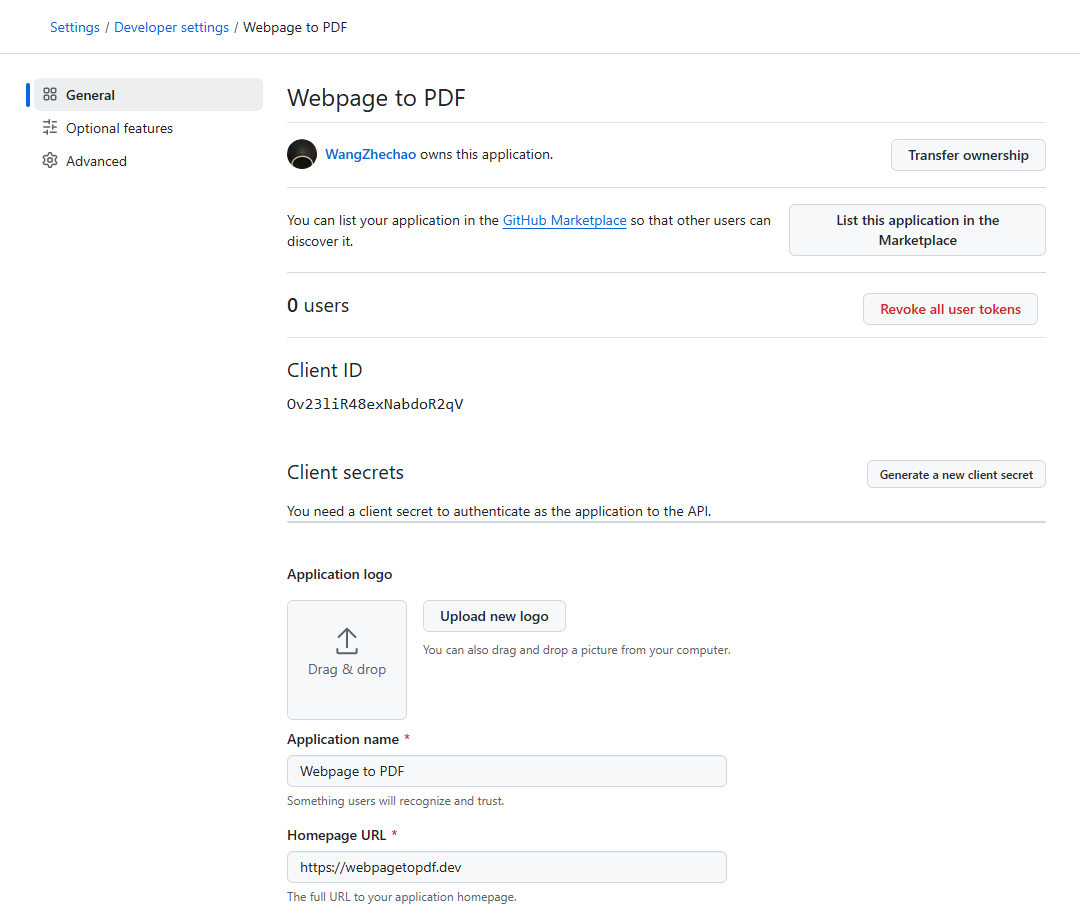
You can complete other details here, such as Logo and Description.
Copy the Client ID, then click Generate a new client secret to create a Client Secret.
The Client Secret is for server use only. Save it immediately in a password manager or the project's environment file. Do not put it in config/deploy.ts, browser code, screenshots, or a Git repository.
Check callback URLs
In the app settings, confirm that every environment has its full callback URL registered and disable unnecessary wildcard matching. Saavo's callback path is fixed, so there is no need to allow arbitrary subdomains or subpaths.
GitHub matches callback URLs. Differences in the protocol, hostname, port, or path can cause redirect_uri_mismatch. localhost and 127.0.0.1 are also different hostnames. Do not mix them.
Check sign-in availability
After registration and credential configuration, users can authorize this GitHub OAuth App. There is no Google-style test-user list or Publish app review step for this sign-in integration. Verify the complete sign-in flow below before releasing your site.
See GitHub's Creating an OAuth app for current UI and field descriptions, and Authorizing OAuth apps for callback matching rules.
Configure the local environment
Open .env in the project root and enter the two values you obtained:
GITHUB_CLIENT_ID="Your GitHub Client ID"
GITHUB_CLIENT_SECRET="Your GitHub Client Secret"
Save and restart the development server:
npm run doctor
npm run dev
When doctor no longer shows GitHub OAuth is not configured, both variables have been read. If you fill in only one, doctor reports the missing value and GitHub sign-in remains disabled on the sign-in page.
Do not commit .env
The template already includes .env in .gitignore. The Client ID appears in authorization requests and is not a password. The Client Secret must remain private. To avoid mismatched credentials, this guide still recommends managing both in the same environment file.
Configure production
After the initial deployment, open .env.production and enter the credentials for production:
GITHUB_CLIENT_ID="Your production GitHub Client ID"
GITHUB_CLIENT_SECRET="Your production GitHub Client Secret"
Then run:
npm run doctor:remote
npm run deploy:update
The deployment script synchronizes the Client ID to Cloudflare as a Worker variable and the Client Secret as an encrypted secret. Do not enter them only through the Cloudflare Dashboard. The local record and remote environment may otherwise differ the next time you run deploy:update.
If the project has not completed its initial deployment, you can leave the OAuth variables empty and run npm run deploy:init. Once you have the actual workers.dev address, add its full callback URL to the GitHub OAuth App, fill in .env.production, and run npm run deploy:update.
After binding webpagetopdf.dev, also add this URL to the OAuth App:
https://webpagetopdf.dev/api/auth/oauth2/githubChanging only VITE_SITE_URL without updating GitHub causes a callback URL mismatch when users return from authorization.
Verify GitHub sign-in
Do more than check for the button. Complete this flow with a real GitHub account:
- Open the site's sign-in page and confirm that the GitHub option appears.
- Click it and confirm that the browser opens
github.comand shows the OAuth App you just created. - Review the requested permissions. Repository read or write permissions should not appear.
- Approve access and confirm that the browser returns to Saavo with the user signed in.
- Sign out, then sign in again with the same GitHub account and confirm that no duplicate user is created.
- Test with an account whose GitHub email is private and confirm that the template still reads an available email address through
user:email.
Test local and production-domain sign-in separately. Correct production settings do not prove that the callback URL for the local port is correct.