Migrate the PDF conversion features
Understand the project layers and migrate the prototype's PDF conversion endpoints and frontend components to Saavo.
The previous article got the Saavo project running locally and configured its branding. This article migrates the validated prototype features into the project.
Migrate the prototype features
With the copy and theme updated, the next step is to gradually migrate the features implemented in the prototype to the new project. The migration takes some work. As mentioned earlier, a person should oversee it, although AI can handle much of the work.
Before migrating features, understand the framework's main layers so you know where new code belongs.
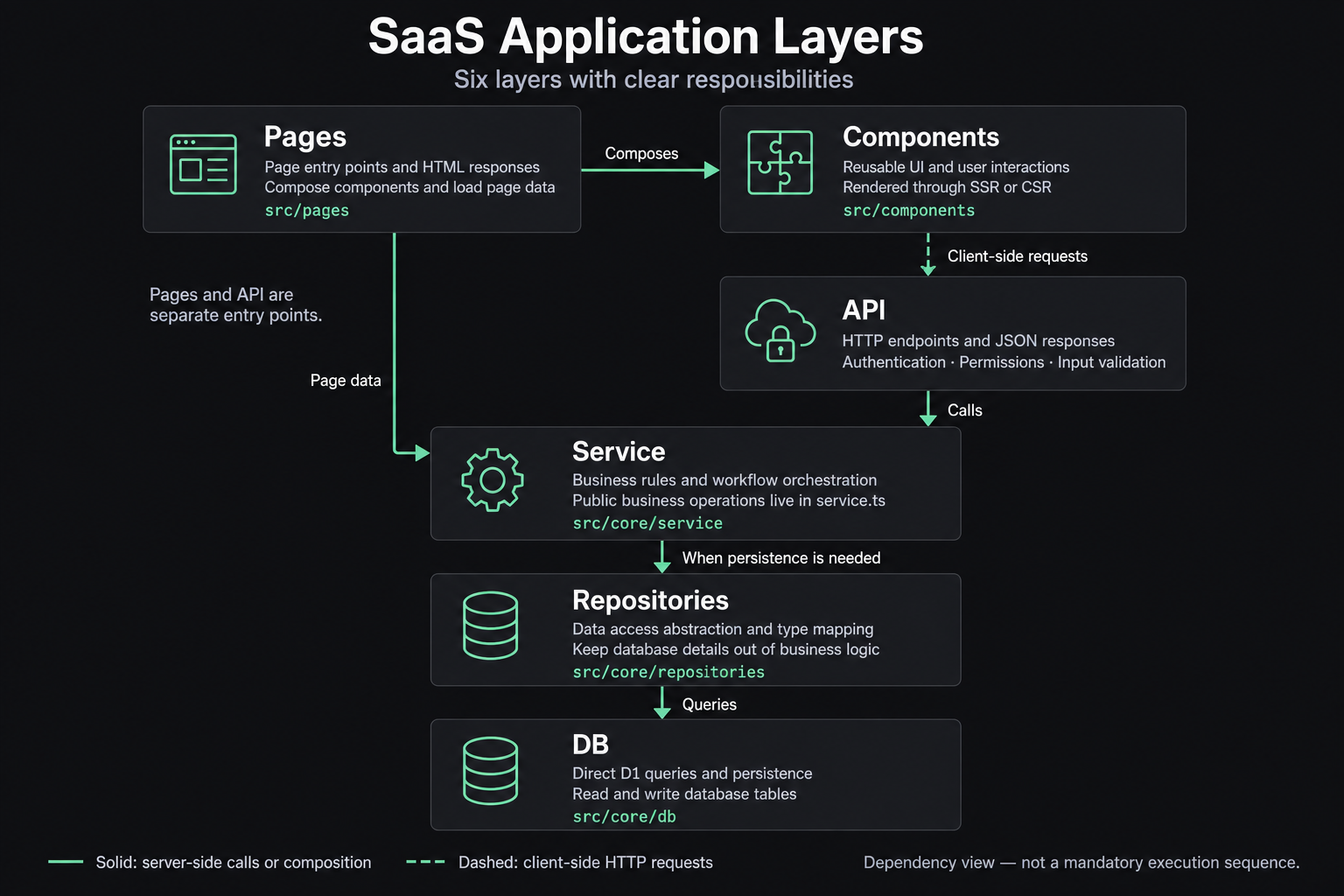
The project follows a traditional layered architecture:
- DB layer.
The DB layer reads and writes directly to Cloudflare D1 databases. Its directory, src\core\db, is organized by business module, with a folder for each module. The code is straightforward: it reads and writes D1 tables directly.
In most cases, you do not need to edit these files manually. When implementing a new business query, you can ask AI to add the corresponding interfaces and query functions.
- Repositories layer.
The Repositories layer handles type conversion and persistence operations, calling the DB layer for its core operations. Located in src\core\repositories, its structure largely mirrors the DB layer. It provides a thin wrapper around the D1 database interfaces, primarily for type conversion.
- Service layer.
The Service layer implements business logic. Its directory, src\core\services, is also organized by business module. It exposes business interfaces to the rest of the application and contains most of the core business logic.
These interfaces are usually in each module's service.ts file. For example, src\core\services\pdf\service.ts implements the PDF conversion service interface.
- API layer.
The API layer exposes HTTP endpoints and returns the appropriate JSON data for each request. It contains relatively little complex logic. Its main responsibilities are authenticating requests, checking permissions, validating parameters, calling business logic, preparing return data, and generating the final HTTP response.
- Pages layer.
The Pages layer renders pages and lives in src\pages. This is the most straightforward layer to understand: as a simplification, each file renders one page.
It is also organized by business module and provides page rendering, calling different components according to the requirements of each module.
Pages are usually exposed through a page.tsx file in the relevant directory. For example, src\pages\pdf\page.tsx renders the PDF conversion page, using components from the Components layer.
This layer also serves HTTP requests directly. Its main difference from the API layer is the response type: the API layer primarily returns json data, while the Pages layer primarily returns HTML pages.
- Components layer.
The Components layer contains page components in src/components. It is generally organized by page or feature so that different pages can compose and reuse components as needed.
The Pages layer typically imports these components and renders them through SSR or CSR for users to see. With the framework's layers established, we can consider how to gradually migrate prototype features into the actual project.
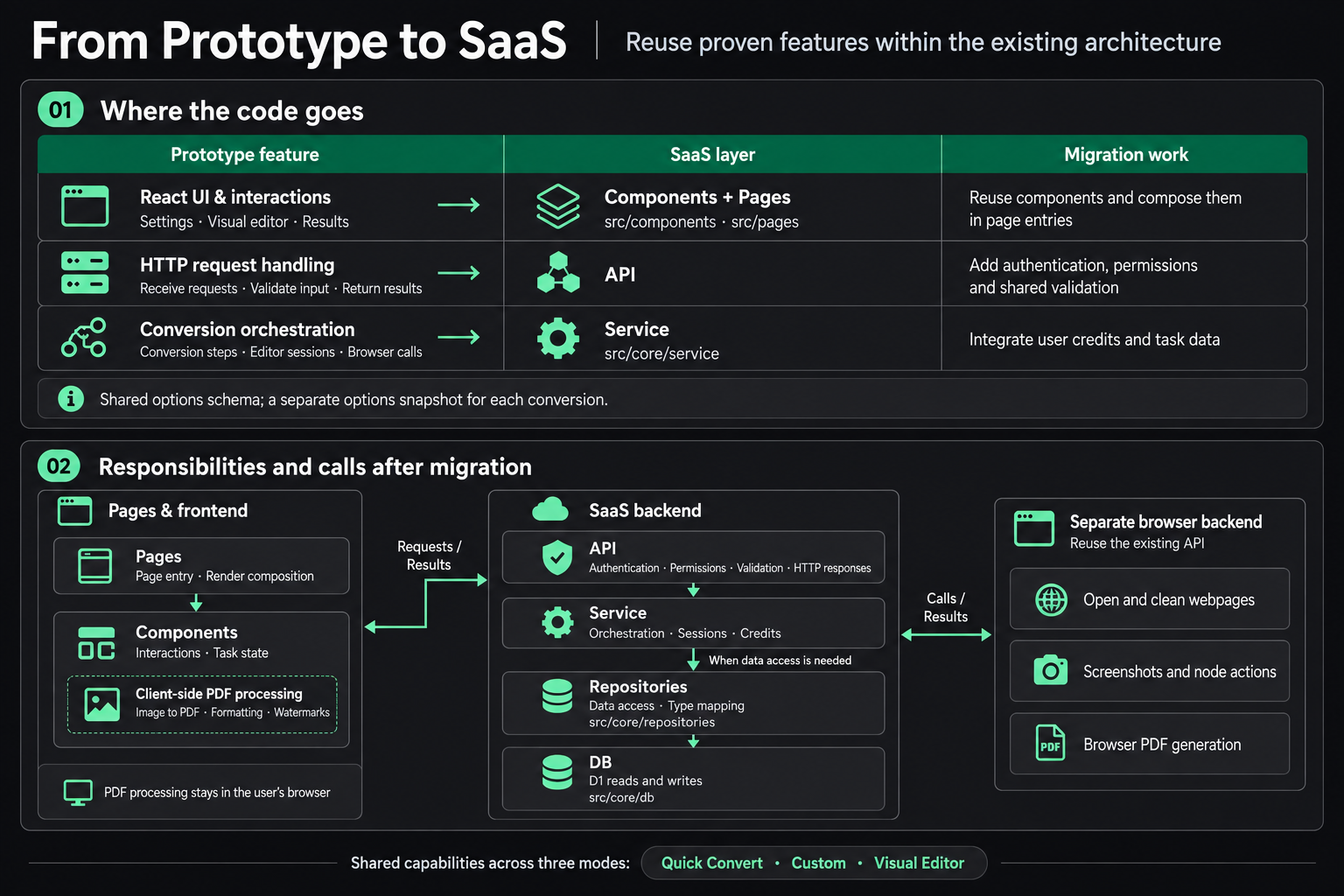
The page work is relatively simple. First migrate the prototype's React components to the Components layer, then import them into the homepage to render it. You can ask Codex to handle this directly.
The PDF conversion service needs more attention. Define routes in the API layer to support the three conversion modes. When a user clicks a conversion button, the frontend calls these endpoints directly and updates the page state based on the backend response.
The API layer handles request authentication, permission checks, parameter validation, and responses. The PDF conversion logic belongs in the Service layer, which accesses DB interfaces through the Repositories layer to carry out the business logic.
Migrate backend endpoints
We can divide the migration into frontend and backend work. Leave the frontend as it is and migrate the backend endpoints first, which makes them easier to test. Ask AI to identify all backend endpoints in the prototype:
| Type | Endpoint | Function | Response format |
|---|---|---|---|
| Quick / Custom conversion | POST /api/convert | Generate a screenshot or source PDF | Streaming NDJSON |
| Visual editing | POST /api/visual/sessions | Create an editing session | Streaming NDJSON |
| Visual editing | POST /api/visual/sessions/:sessionId/actions | Perform editing actions | JSON |
| Visual editing | POST /api/visual/sessions/:sessionId/generate | Generate a source PDF | JSON |
| Visual editing | DELETE /api/visual/sessions/:sessionId | Close the session and finalize quota usage | JSON |
Have AI migrate these endpoints incrementally. Review the boundaries after each migration to prevent tangled logic or missing functionality.
My approach is to start with POST /api/convert. Instead of asking AI to migrate it all at once, have it work in steps. Migrating too much code at once can make the code disorganized, introduce problems, and make human review difficult.
These are the steps I followed:
- Migrate external dependencies. I created a separate Worker for the core PDF generation, so this comes first. It is independent and involves only RPC calls, with little complex logic.
- Create the PDF service based on the old project's logic, including interface definitions, business logic, and unit tests.
- Create the public API endpoints, which call the PDF service to perform the business logic.
I reviewed each step after AI completed it. The generated code was usable but fell short of what I wanted, so I asked AI to redo the parts that did not meet the requirements. You can also ask it to write a test client to check the API endpoints against real scenarios.
The PDF conversion endpoints open user-submitted URLs on the server, so frontend input checks alone are insufficient. At a minimum, the backend must allow only public HTTP/HTTPS addresses and recheck the destination after every redirect, rejecting localhost, private network addresses, and link-local addresses. It must also limit page load time, redirect count, generated file size, and concurrent tasks so that a single request cannot occupy resources for too long.
Generated PDFs must not use fixed, easily guessed URLs. The download endpoint must check task ownership, and temporary files need a cleanup deadline. These restrictions belong to the conversion service itself and should be verified locally before deployment.
Migrate frontend components
Frontend migration is relatively straightforward because the components are all React components and can move directly into the Components layer. AI can handle the migration with few problems in most cases. Pay particular attention to merging styles and removing old components that are no longer needed.
The prototype also depended on a third-party service for fonts, so I asked AI to move them into the project locally. These are not the fonts used by the website UI. They may be needed when generating PDFs, since PDFs can contain languages other than English.
The mobile layout also needs work from AI. I did not address it during prototyping, and the UI looked very poor on mobile, so it needed fixing.
The remaining work is to restore and tune functionality and adjust styles. This is relatively simple but requires careful testing. Report any issues you find to AI so it can fix them.
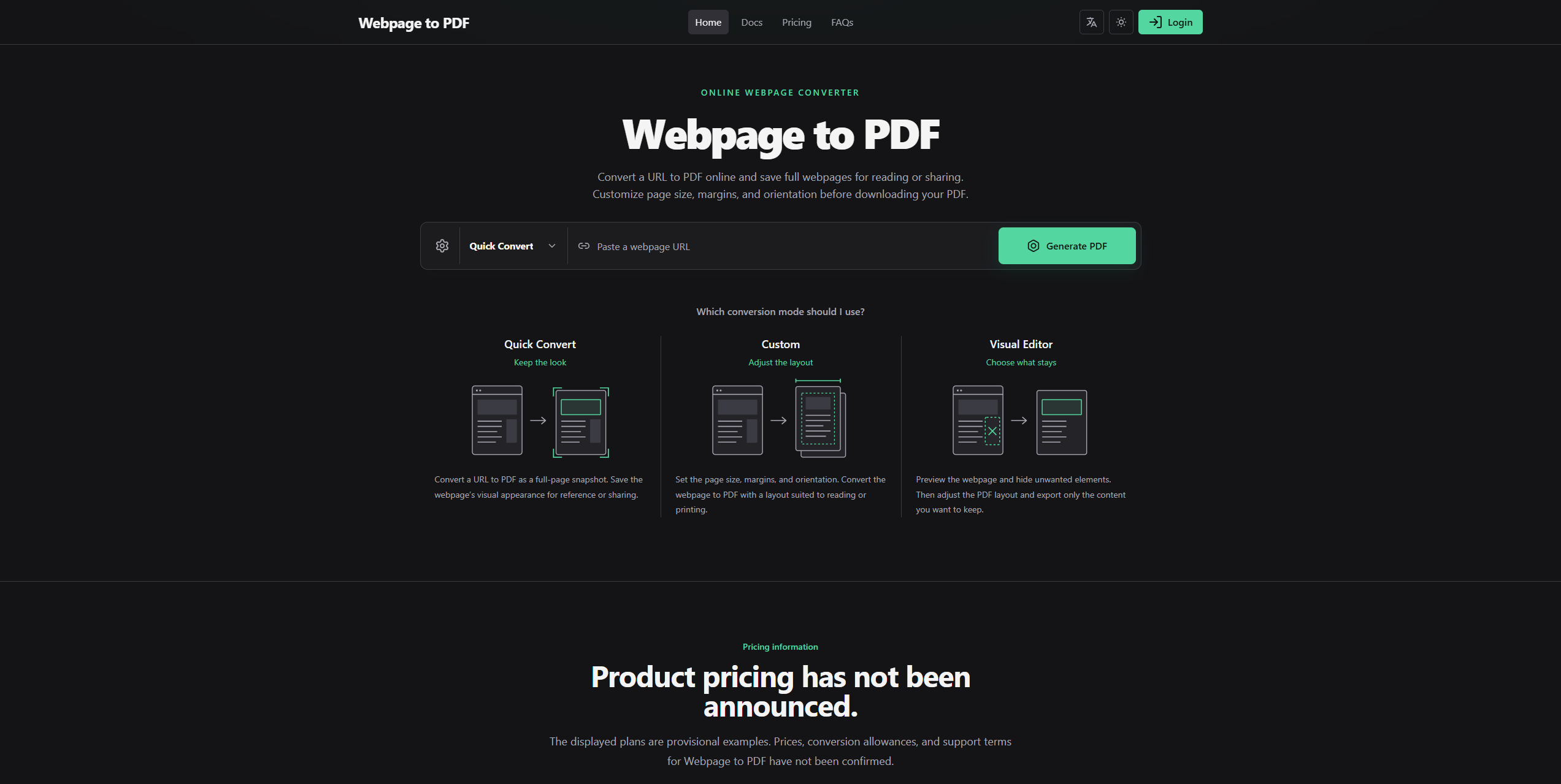
The screenshot below shows the result after migration. This requires attention to detail and gradual bug fixes. Do not expect current AI tools to solve everything in one attempt. They cannot do that yet:
This article does not go into extensive implementation detail for two reasons.
First, AI handled most of the prototyping and migration, with many rounds of adjustments and revisions. Recording that entire process would be difficult.
Second, this series has always focused on developing products quickly with the Saavo template. Everyone's product is different, and the implementation of specific business features can vary considerably. There is no easy way to define a development process that fits every project, so these details do not need to be covered here.
I could document every detail of Webpage to PDF from prototype to implementation, but that would gradually take this series away from its original purpose.
The following articles cover parts of the Saavo template that apply more broadly and deserve closer attention.
Checklist
By the end of this article, you should be able to use all three conversion modes locally and check the conversion endpoints, download flow, and mobile pages.
Tutorial overview · Previous: Create the project and configure branding · Next: Define plans and integrate entitlements