Affiliate program
Referral links, commissions, and monthly settlements. Adjust the commission policy for your product to get started. Payouts still require administrator review.
The Saavo template includes a complete affiliate system covering referral link generation, signup attribution, plan-based commission calculations, a user-facing commission overview, and monthly settlements in the dashboard.
When developing your own product, you usually do not need to build a commission system from scratch. Enable the affiliate program and configure commission rates for your actual plans. The system then records commissions automatically after successful payments.
The template only records and displays commission data. Actual payouts, such as those through PayPal or bank accounts, still require manual action. The system does not replace manual review or transfer funds automatically.
Available features
After template initialization, the following features are available out of the box:
| Feature | Default entry point | Default status |
|---|---|---|
| Program introduction page | /affiliate | Always accessible |
| Referral links | /ref/:code | Registered when the affiliate program is enabled |
| User affiliate center | /account/affiliate | Requires sign-in and an enabled affiliate program |
| Affiliate users | /dashboard/affiliates/users | Accessible to administrators |
| Monthly settlements | /dashboard/affiliates/payouts | Administrators review payouts |
The system records referral codes in an HttpOnly cookie (saavo_affiliate_referral) using first-touch attribution. When an anonymous visitor first follows a valid referral link, the system saves the code. Clicking other referral links later does not overwrite the original attribution.
When a new user completes signup, the system automatically attributes them to the corresponding affiliate. Signed-in users clicking referral links also retain their existing attribution. The system applies strict requirements for affiliate eligibility and financial security. Users must sign in and verify their email before they can enter the affiliate center and enable their affiliate account. Because payout details are sensitive, only eligible affiliates can access that section. Reading or saving payout details also requires step-up authentication.
The system automatically writes commission data after successful payment webhook processing. Commission policies must reference product and plan IDs that exist in config/products.ts. If a policy points to a plan that is not configured, the system cannot generate or record a commission.
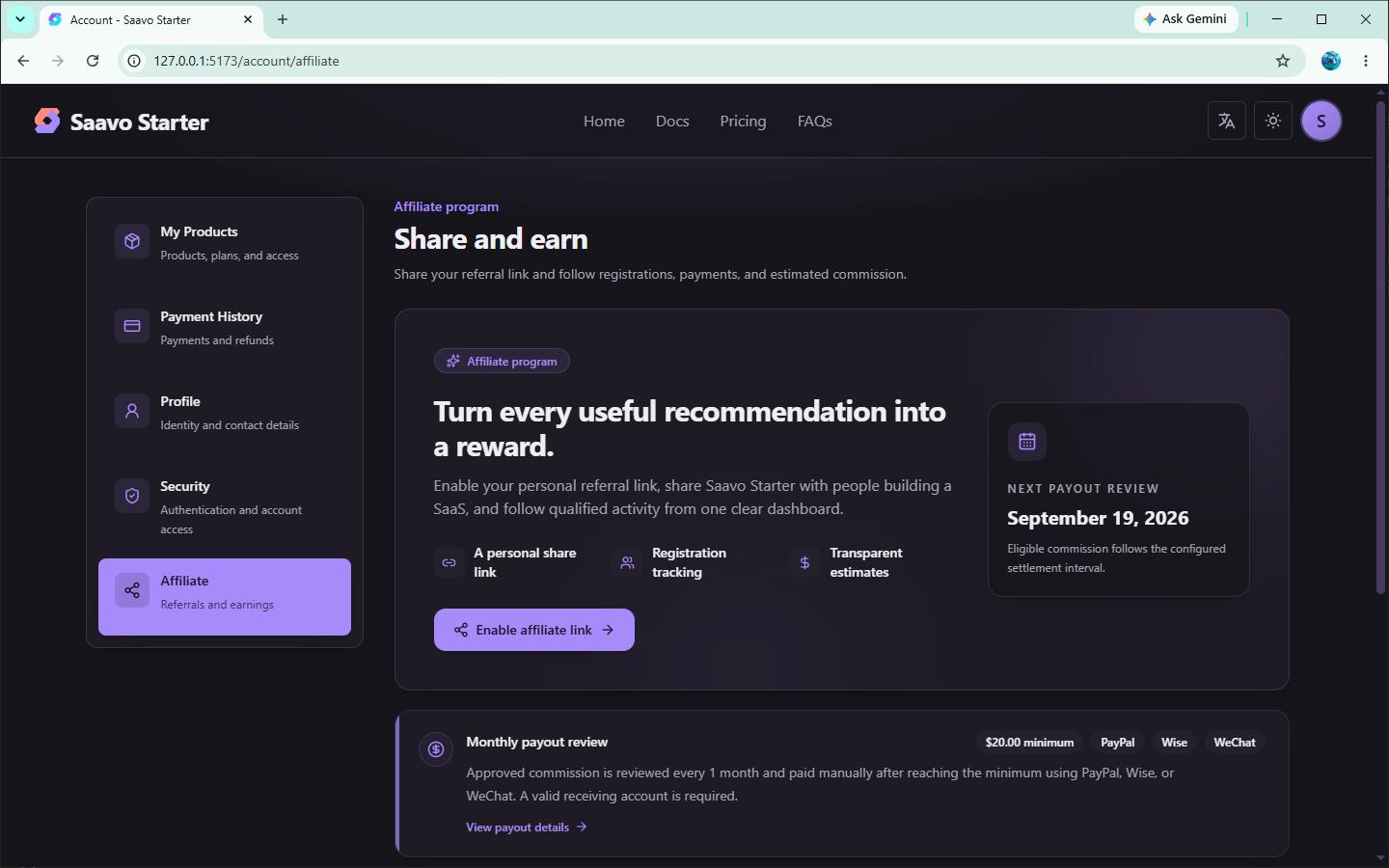
Try the affiliate workflow first
Before changing commission rates, we recommend reviewing the default flow.
The affiliate enables the affiliate feature in the account center
↓
Receive an 8-character referral code with a link at /ref/{code}
↓
A visitor opens the referral link, which sets the referral cookie
↓
The visitor signs up
↓
The user later purchases a plan with commission configured
↓
A commission record is written after successful payment
↓
The administrator refreshes, reviews, and records payouts on the monthly settlement page
The default policy calculates commissions only for the example saavo_starter.license product plan, at 20% of the net amount.
The current default limits commissionable payments to 1. Commissions are therefore calculated only once, rather than repeatedly for each billing cycle. For one-time purchases, the cycle setting does not apply, and the system records only one commission by default.
Tip
Both 20% and the license plan are examples. Before making the program public, you must replace them with your own product and actual commission rate. Otherwise, commissions will use the template's rate.
Configure the affiliate program
Configure the affiliate master switch and commission policies in config/affiliate.ts.
Enable or disable the affiliate program
It is enabled by default:
enabled: true,Set it to false if you do not need an affiliate program. When disabled:
/ref/:codeis no longer registered/account/affiliatereturns 404- The affiliate item disappears from account navigation
- User-facing affiliate APIs return 404
After an administrator disables the affiliate program, /affiliate remains accessible but displays a message that the feature is currently unavailable. The affiliate module remains in the admin dashboard, where administrators can still view existing affiliates, commissions, and other historical data.
Set commissions by plan
plans must match IDs in the product catalog. Products without a configuration do not generate commissions.
Percentage example:
saavo_starter: {
    license: {
        commission: {
            type: 'percentage',
            basisPoints: 2000,
            base: 'net_subtotal',
        },
        subscriptionPaymentLimit: 1,
    },
},
In this configuration:
basisPoints: 100means 1%, and2000means 20%.base: 'subtotal'uses the subtotal before discounts and taxes.base: 'net_subtotal'uses the subtotal after discounts but before taxes.base: 'total'uses the final amount including taxes.subscriptionPaymentLimit: 1counts successful payments, not calendar months.1counts only the first payment.
You can use a fixed amount instead. Each plan can use only one commission type at a time. Policy changes do not rewrite commission snapshots already stored in the database. When monthly settlements are refreshed, the subscription payment limit is recalculated using the current configuration.
Set settlement rules
The same file controls the settlement interval and payout methods:
payoutInterval: '1 month',
payout: {
    methods: ['paypal', 'wise', 'wechat'],
    minimumAmountMinor: 2000,
    currency: 'usd',
},
minimumAmountMinor uses the currency's smallest unit. 2000 with usd means US$20.00. After refreshing and reviewing monthly settlements in the dashboard, administrators pay affiliates themselves and save the payment records.
Use the affiliate program in your product
Most products need no additional business code for the affiliate program. After a successful payment, the template matches the plan by Price ID and records the commission. You still need to ensure that:
- Plan IDs in the product catalog match the affiliate policy
- All commissionable plans are listed in
affiliate.plans - Referral entry points use the user's own
/ref/{code}link
Do not insert commission rows from the Checkout success page or create a parallel commission ledger like user_credits.
If your product has its own landing page, you can reuse the existing referral cookie capture logic. Do not create a second attribution cookie.
Pre-launch checks
The affiliate program involves real revenue sharing. Before launch, we recommend checking at least the following:
- The commission policy no longer uses the example 20% rate and references real product/plan IDs.
- Purchasing a plan without a commission configuration does not generate a commission.
-
/ref/{code}writes the referral cookie, and new users are attributed to the affiliate after signup. - After a test-card purchase of a commissionable plan, a commission record appears in the dashboard.
- Affiliates can view commissions and enter payout methods at
/account/affiliate. - Users with unverified email addresses cannot enable their affiliate account, and changes to payout details require step-up authentication.
- Administrators can refresh monthly settlements, review them, and record payouts.
- If the affiliate program is not needed,
enabledis set tofalse, and its account entry point has disappeared.
We recommend testing with two accounts: one as the affiliate and one as a newly referred user who completes a purchase.
Frequently asked questions
Next steps
Choose further reading based on what you need to build:
- See how a real product defines plans and entitlements → WebpageToPDF tutorial
- Confirm payment recording → Payments and plans
- Review payouts in the dashboard → Admin dashboard
For most products, completing this chapter only requires changing the switch and commission policy.
Payouts, taxes, and contracts remain part of your own operational processes.