Internationalization
Enable languages in config/i18n.ts and manage text in locale JSON files. Add and translate the languages your product needs without integrating another i18n framework.
The Saavo template includes multilingual support, with English, Simplified Chinese, and Traditional Chinese available by default. URL prefixes distinguish languages, and page text comes from the corresponding locale files.
When developing your own product, you usually do not need another i18n library. Enable the languages you need in configuration and provide their translations. Pages and server-side code can use the project's Localized, localized, and serverLocalized APIs to output localized text.
Available features
After template initialization, the following internationalization features are available out of the box:
| Feature | Default | Description |
|---|---|---|
| Enabled languages | en, zh-Hans, zh-Hant | config/i18n.ts |
| Default language | en | Routes without a prefix |
| Other language prefixes | /{code}/... | For example, /zh-Hans/docs |
| Text files | locales/en.json and others | en.json is the authoritative source for keys and types |
| Language switching | Language switcher at the top of the page | Switches between enabled languages |
Pages determine their language from the URL path prefix, while APIs use the Accept-Language request header. Although the adapter retains a configuration name for a locale cookie, the current language detection flow does not read cookies. URLs and request headers determine language switching, and cookies do not affect it.
Configuration content, such as site and plan names, can also be localized. Use { value, key } for configuration fields that need translation: value supplies the default text, and key points to the corresponding translation in the locale file.
Read browser-side configuration from @/libs/config/client. Configuration such as deploy.ts, entitlements, and secrets belongs on the server. Do not import it directly into frontend code, where it could be bundled into the browser.
Try language switching first
Open the homepage and use the language switcher to switch between English and Chinese. The default language's URL has no prefix:
/                  English homepage
/zh-Hans           Simplified Chinese homepage
/zh-Hant           Traditional Chinese homepage
/docs              English documentation
/zh-Hans/docs      Simplified Chinese documentation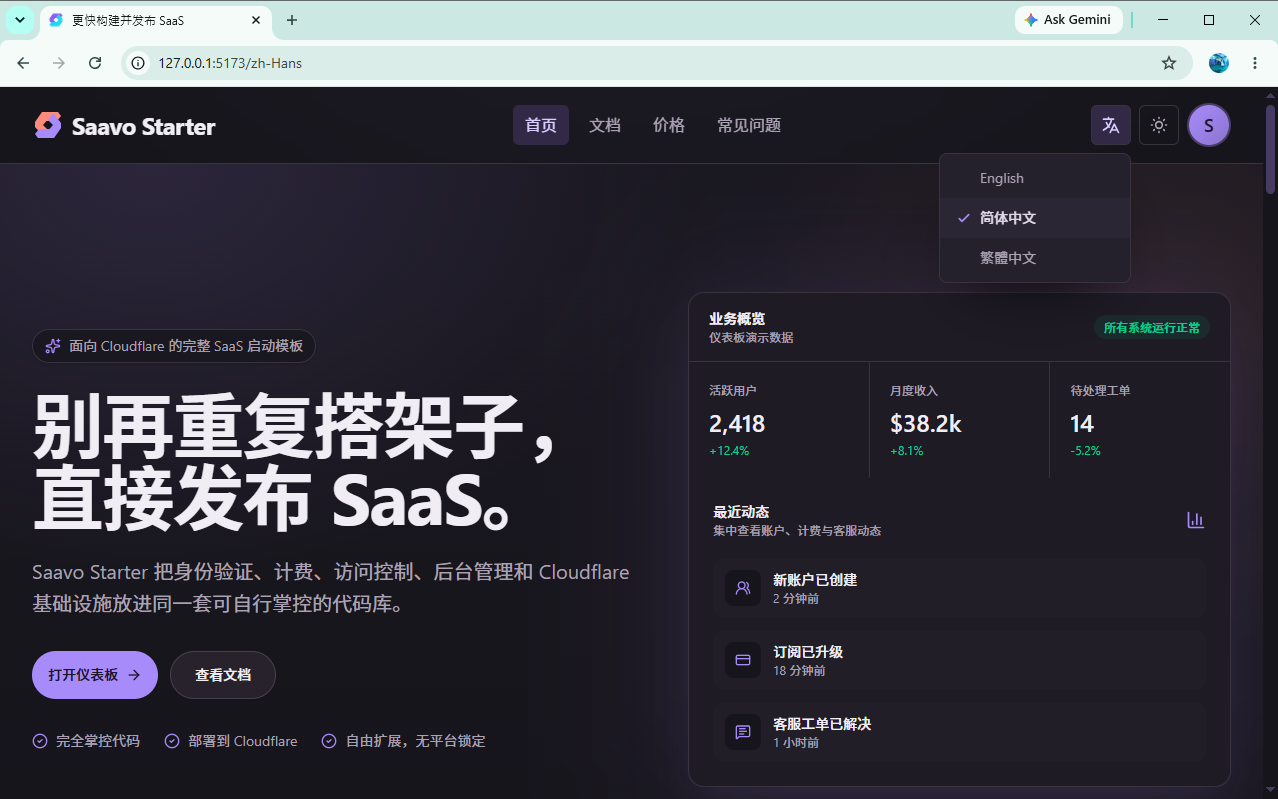
The template also includes commented-out entries for other languages, including the RTL language ar. They are disabled by default and do not appear in the language list.
Tip
When changing the brand name, update the corresponding text in every enabled language. If you change only English, Chinese pages may still display the default “Saavo Starter”.
Configure languages
Configure the language list in config/i18n.ts. Text is stored under locales/, with a separate JSON file for each language.
Add a language
- Uncomment or add a
{ code, name, direction }entry inlanguages. - Add
locales/{code}.jsonwith keys matchinglocales/en.json. - If you have documentation or a blog, add content in
content/docs/{code}/and the corresponding blog directory. - Translate all keys used in legal pages, emails, and product configuration.
- For RTL languages, set
direction: 'rtl'.
defaultLanguage determines the language used by routes without a language prefix, so do not change it casually. After a change, unprefixed pages that previously served English use the new default language, and existing English URLs may change as a result.
For the complete procedure, see:
Change branding and interface text
To change text in one language, edit its locale JSON file. For shared content such as a brand name, update the translation files for every enabled language. For example, changing the product name from “Saavo Starter” to “My Product” requires updating locales/en.json, locales/zh-Hans.json, and locales/zh-Hant.json.
LocalizedText configuration can contain both value and key. When key is configured, the system looks up its translation in the locale file first. If the current language lacks that translation, it falls back to the default English text in value.
Fixed user-facing text in components should also be managed in locale files. Do not hard-code long Chinese or English sentences in JSX. For example, define a components.billing.purchaseFailed key in the locale file for a purchase failure message instead of hard-coding “Purchase failed, please try again.” in the component.
Use localization in business code
Business code should use only the project's three APIs, all imported from @/components/server/Localized. Do not read locale JSON directly.
The server in the path only indicates that <Localized /> outputs plain strings without additional interaction. It works on both the client and server and is not restricted to server-side calls. localized() also works in client components and callbacks such as click and submit handlers. Only serverLocalized() requires an existing Ctx or WorkerCtx.
Choose the API based on where the text appears:
| Location | API |
|---|---|
| Visible text in JSX | <Localized /> |
aria-label, placeholder, alt, toasts, function return values | localized() |
| Page SEO, API responses, emails, and other places with a request context | serverLocalized() |
JSX text:
import { Localized } from '@/components/server/Localized';

<h2>
    <Localized
        id="components.profileSettings.title"
        default="Profile Settings"
    />
</h2>
Attributes, toasts, and other places that require strings:
import { localized } from '@/components/server/Localized';
import { toast } from 'react-toastify';

<img
    alt={localized({
        id: 'components.profileSettings.avatar.alt',
        default: 'User avatar',
    })}
/>

<input
    placeholder={localized({
        id: 'components.profileSettings.fullName.placeholder',
        default: 'Enter your full name',
    })}
/>

toast.error(localized({
    id: 'components.billing.purchaseFailed',
    default: 'Purchase failed, please refresh the page and try again.',
}));
Server-rendered pages, APIs, and emails that already have c:
import { serverLocalized } from '@/components/server/Localized';

const pageTitle = serverLocalized({
    c,
    id: 'pages.home.title',
    default: `${siteName} - A complete SaaS starter for Cloudflare`,
    values: { siteName },
});
id must be an existing key in locales/en.json. default is the English fallback for a missing translation. Email templates also use serverLocalized, with keys such as email.welcome.text.
To insert dynamic content such as names or counts, keep the complete sentence in the locale file with placeholders such as {name}, then pass substitutions through values. Do not translate fragments separately and concatenate them into a sentence.
localized({
    id: 'components.account.products.cadence.everyMonths',
    default: 'Every {count} months',
    values: { count },
});
Do not format dates, times, or amounts inside translation strings. Format them for the current language first, then pass the results through values. On the server, use c.var.getLocale(). Client components usually receive locale from the page. Use formatMinorAmount for monetary amounts.
import { formatMinorAmount } from '@/libs/utils/currency';

const date = new Intl.DateTimeFormat(locale, {
    year: 'numeric',
    month: 'short',
    day: 'numeric',
}).format(paidAt);

const amount = formatMinorAmount(totalMinor, currency, locale);
Although the underlying implementation uses @intlify/core, business code should not call its numberFormat / datetimeFormat directly. The project has no separate configuration tables for those formats. Use values for named interpolation as shown above, and Intl for numbers and dates.
Escape pipe characters in translations
Saavo currently uses @intlify/core internally to process translations. Besides ordinary variable interpolation, this library supports message syntax such as pluralization, where | has a special meaning.
An unescaped | in translation text separates plural branches, allowing different text to be selected by count. For example:
{
    "itemCount": "One item | {count} items"
}
Different counts automatically select the corresponding text:
// One item
localized({
    id: 'itemCount',
    values: { count: 1 },
});

// 5 items
localized({
    id: 'itemCount',
    values: { count: 5 },
});
Two common forms are:
| Text form | Branch meaning |
|---|---|
singular text | plural text | Uses the first branch for 1 and the second for other counts |
zero-count text | singular text | plural text | Handles 0, 1, and other counts, respectively |
For example:
{
    "itemCount": "No items | One item | {count} items"
}
To display an actual | on the page, you cannot simply insert it into translation text.
This is uncommon in ordinary text but easy to encounter in titles, where | often separates the site name from the page title. For example:
{
    "pages": {
        "home": {
            "title": "{siteName} | Product Overview"
        }
    }
}
The translation engine treats this | as a plural branch separator, so only part of the text may appear.
To display a literal |, use:
{
    "pages": {
        "home": {
            "title": "{siteName} {'|'} Product Overview"
        }
    }
}
The | is then output as an ordinary character instead of being parsed as plural syntax.
This issue is easy to encounter when editing page titles, so take particular care when using |.
Pre-launch checks
Localized text is directly visible to users. Before launch, you should confirm at least the following:
- All enabled languages are accessible through the language switcher, with correct URL prefixes.
- Brand names and key page text in
locales/en.json,zh-Hans.json, andzh-Hant.jsonuse your product's content. - New language JSON files match the English keys, with none missing.
- Documentation and blog content exist in the language, or you accept missing pages.
- Legal pages, email subjects, and email bodies are translated.
-
defaultLanguageis unchanged unless you have confirmed the new meaning of unprefixed routes.
You should open the homepage, sign-in page, pricing page, and one documentation page in every enabled language, rather than checking only English.
Frequently asked questions
Next steps
Choose further reading based on what you need to build:
- Add a language → Add a language
- Translate hard-coded component text → Use the repository's i18n skill
- Write multilingual documentation → Documentation system
- Write multilingual blog posts → Blog
For most products, completing this chapter leaves only locale files and content directories to maintain.
Use Localized for text in new pages from the start, so you do not need to extract strings later.