Analytics
Configure first-party analytics, event collection, conversion funnels, Web Vitals, data retention, and third-party analytics services.
Saavo includes first-party analytics for a single site. A frontend script collects pageviews, custom events, and Web Vitals. Cloudflare Queue delivers the data to a separate D1 database, and administrators can view traffic, events, sessions, conversion funnels, and page performance in the dashboard.
The project also supports third-party analytics services such as Google Analytics, Microsoft Clarity, and Umami. First-party analytics and third-party scripts are independent: config/deploy.ts controls first-party analytics, while config/analytics.ts configures third-party scripts.
This feature serves only the currently deployed site. It is not a multisite analytics platform. It is intended as lightweight analytics for a SaaS website's first 100 days. You can consider migrating to a third-party analytics service later.
Available features
| Feature | Entry point or resource | Current default |
|---|---|---|
| Browser tracking script | /js/analytics.js | Automatically records pageviews and SPA route changes |
| First-party collection endpoint | POST /api/analytics/collect | Enabled |
| Asynchronous write queue | analytics-events / ANALYTICS_QUEUE | Producer and consumer configured |
| Analytics database | ANALYTICS_DB | Separate from the application database DB |
| Analytics dashboard | /dashboard/analytics | Administrators only |
| Data cleanup | Cron 30 */6 * * * | Runs every 6 hours |
| Third-party analytics scripts | config/analytics.ts | All required IDs are empty, so no scripts load |
The analytics dashboard contains these pages:
- Overview: Pageviews, visitors, visits, bounce rate, average visit duration, and breakdowns by page, source, device, and region.
- Events: Custom event trends, event properties, and recent activity.
- Sessions: Browser sessions, visit records, page and event timelines, and properties written by
identify(). - Conversion funnels: Entrants, completions, conversion rates, and drop-off calculated from the configured steps and time window.
- Performance: Real-user LCP, INP, CLS, FCP, TTFB, and time on page, with P75 values, trends, and grouped statistics.
How data is written
Normal browser collection follows this sequence:
- During page rendering, the application checks the analytics master switch, site status, request domain, and ignored paths. It loads
/js/analytics.jsonly if these checks pass. - The browser script collects pageviews, custom events, or performance metrics and sends them to
POST /api/analytics/collect. - The collection endpoint validates the site ID, visit strategy, origin domain, exclusion rules, bot traffic, and request rate.
- If validation passes, events enter the
analytics-eventsqueue. The consumer then writes them toANALYTICS_DB. - The dashboard queries analytics data within the retention period directly. Newly reported events do not appear immediately if the queue has not yet been consumed.
The collection endpoint returns 202 after accepting a message. Queue messages have at most 3 attempts to be written to the database. If the final attempt fails, the error is logged and the message is discarded. The project currently has no dead-letter queue configured for analytics.
Default configuration
First-party analytics settings are in the analytics section of config/deploy.ts. The main settings are:
analytics: {
    enabled: true,

    retention: {
        enabled: true,
        rawDays: 100,
        eventBatchSize: 5_000,
        sessionBatchSize: 1_000,
        maxD1OperationsPerRun: 40,
        maxRuntime: '2m',
    },

    site: {
        id: '00000000-0000-4000-8000-000000000001',
        status: 'active',
        allowedDomains: [],
        visitStrategy: 'umami',

        tracker: {
            performance: true,
            respectDoNotTrack: true,
            excludeSearch: false,
            excludeHash: true,
        },

        collection: {
            ignoredPathPrefixes: ['/dashboard'],
            ignoredIps: [],
            ignoredUserAgentSubstrings: [],
            ignoredDistinctIds: [],
        },
    },

    rateLimit: {
        enabled: true,
        maxRequests: 120,
        windowDuration: '1m',
    },
}
These defaults mean that:
/dashboardand its subpaths do not load the first-party tracking script, and the collection endpoint does not accept them.- URL query parameters are retained, but the URL hash is removed.
- Web Vitals and time on page are collected, and the browser's Do Not Track setting is respected.
- Each site and trusted client IP can submit at most 120 collection requests within 1 minute.
- Raw events are retained for the current UTC day and the preceding 100 complete UTC days.
rawDaysdoes not directly delete identified sessions or their traits (session properties). The cleanup task also removes anonymous sessions that no longer have events referencing them.
Required configuration changes
Before launch, confirm that the site ID, site URL, and Cloudflare resources belong to the current project.
- Generate a new UUID for
site.id. - Confirm that
VITE_SITE_URLis the site URL for the current environment. Analytics automatically allows its hostname. Local sites automatically allowlocalhostand127.0.0.1. Add entries toallowedDomainsonly if you need to accept additional domains. Otherwise, keep the default empty array. - In the local environment,
saavo:initinitializesANALYTICS_DB. On the first remote deployment,deploy:initcreates and binds the database and theanalytics-eventsQueue. - Put subsequent database changes in
schema/migrationsand apply them withdb:migrate:localor the deployment script. Do not rerun initialization files as incremental migrations. See Local development for the workflow. - Replace the example funnels in
analytics.site.dashboard.funnelswith your product's actual conversion paths.
The project includes four funnels: affiliate referral conversion, signup conversion, pricing page to Checkout creation, and continuing Checkout after sign-in. These are examples only. Their steps, event names, and property filters come from the template's business logic and should not be used unchanged for other products.
How visits are defined
visitStrategy determines what counts as a visit. The current value is umami, and sliding is also supported. Once the site starts producing production data, do not change this value directly, as doing so would mix different counting methods within the same dataset. If a change is necessary, use a new site ID or clean up or migrate the old data first.
Data retention
Raw event cleanup runs on 30 */6 * * *. The task deletes expired events and anonymous sessions with no event references in batches, subject to per-run D1 operation and runtime limits. If one run cannot finish the cleanup, subsequent Cron runs continue it. If cleanup consistently falls behind incoming data, the system writes warning and alert logs.
The Cron string in wrangler.jsonc must exactly match ANALYTICS_RETENTION_CRON in src/entry/index.ts. Otherwise, the scheduled entry point will not run the corresponding task.
Record business events
Browser events
Use trackBrowserEvent() in the browser:
import { trackBrowserEvent } from '@/libs/analytics/client';

trackBrowserEvent('login_modal_opened', {
    reason: 'checkout',
});
You can define browser event names for your business. You should maintain a shared naming and property specification to avoid multiple names for the same action. If the tracking script has not loaded, the user has disabled it, or the request fails, trackBrowserEvent() skips tracking without affecting the business operation.
You can also record clicks with HTML attributes:
<button
  data-saavo-event="checkout_started"
  data-saavo-event-plan="pro"
>
  Buy now
</button>
Server events
Use trackRequestEvent() for business outcomes that the server needs to confirm:
import { trackRequestEvent } from '@/core/services/analytics/service';

trackRequestEvent(c, {
    name: 'checkout_session_created',
    data: {
        productId,
        planId,
        planType: plan.type,
        provider: 'stripe',
    },
});
The server currently accepts only these events:
signup_completedlogin_completedcheckout_session_createdaffiliate_referral_clicked
To add a server event, you must extend the AnalyticsRequestEvent type and define its properties. You cannot pass an arbitrary string. Server events are submitted asynchronously through waitUntil(). Analytics failures are only logged and do not turn a successful signup, sign-in, or Checkout request into a failure.
The project's getService() and postService() automatically attach signed request headers for the current analytics session, allowing subsequent server events to use the same session and visit as the browser. Business code should not generate or parse x-saavo-* request headers itself.
Associate sessions with users
To associate an anonymous session with an internal user identifier, use:
window.saavo.identify('internal-user-id', {
    plan: 'pro',
});
Use an internal ID or an irreversible hash. Do not report unnecessary personal information such as email addresses, phone numbers, or names. identify() saves the latest state of session properties, not their change history. To retain the state at a particular time, include those properties in the corresponding event.
Exclude unwanted traffic
The project provides four configuration-based exclusions:
ignoredPathPrefixes: Excludes by path prefix. Includes/dashboardby default.ignoredIps: Excludes exact matches for trusted client IPs.ignoredUserAgentSubstrings: Excludes case-insensitive User-Agent substring matches.ignoredDistinctIds: Excludes exact matches for browser-provided distinct IDs (visitor identifiers).
These rules run on the server. Redeploy after changing them.
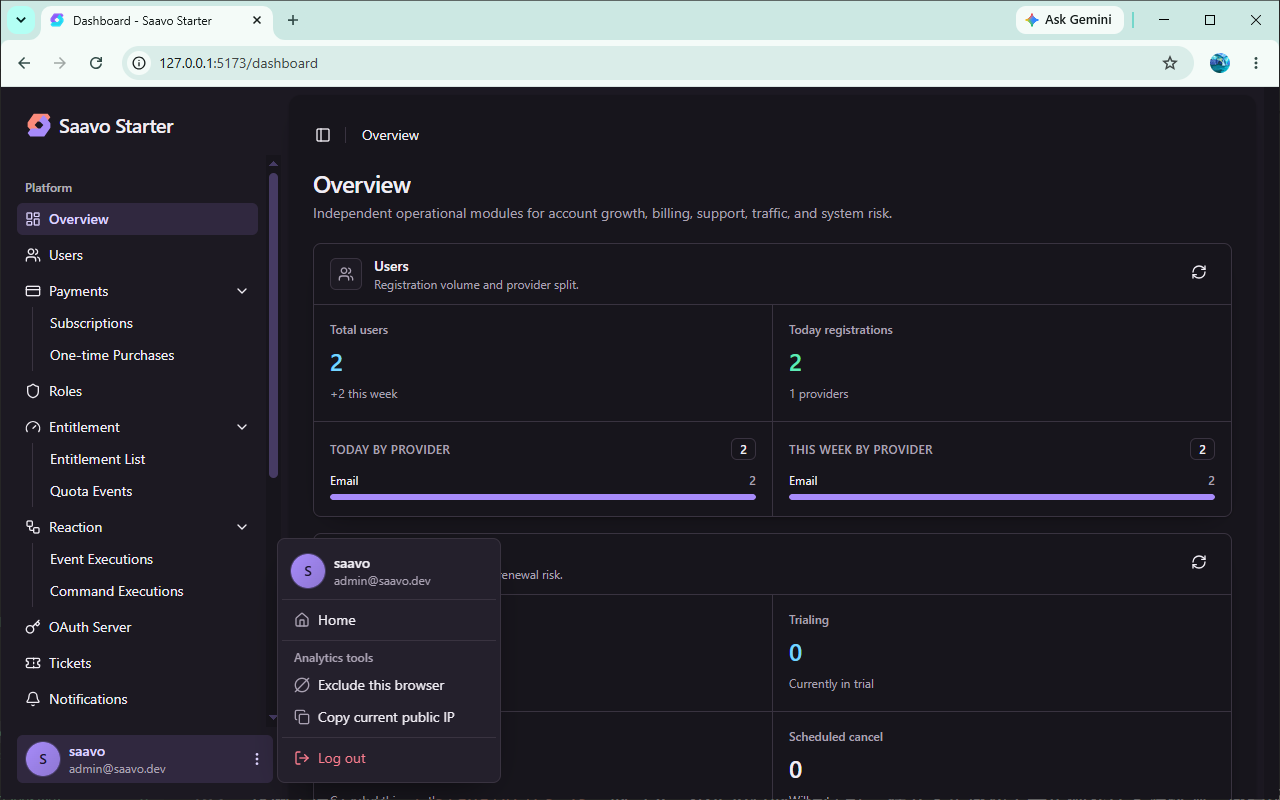
Administrators can also select Exclude this browser from the dashboard's user menu to write saavo.disabled=1 to the current browser's localStorage. This setting affects only that browser. It does not exclude other devices by account or IP. To restore tracking, select Resume browser analytics or delete the storage entry.
Add third-party analytics services
config/analytics.ts currently supports:
- Google Analytics
- Microsoft Clarity
- Cloudflare Web Analytics
- Umami
- Plausible
- PostHog
- Seline
- Ahrefs Web Analytics
- DataFast
- OpenPanel
All providers' required IDs, keys, or script URLs are empty by default, so no third-party analytics scripts load. To use a provider, fill in all its required fields and keep the corresponding entry's key consistent in config/cookie-consent.ts.
Third-party script loading depends on the cookie consent mode:
silent: Loads configured third-party scripts directly. The project currently uses this mode.prompt: Loads a script only after the user consents to the corresponding analytics entry.disabled: Shows no consent interface and injects no third-party analytics scripts.
The first-party /js/analytics.js script is not controlled by the third-party analytics category. Even if a user rejects third-party analytics scripts, the browser still requests /api/analytics/collect when first-party analytics remains enabled and the request meets the site rules. Before launch, assess privacy notice and consent requirements for your target market and the fields you actually collect. See Cookie consent.
Disable first-party analytics
If you do not need first-party analytics, set the master switch to false:
analytics: {
    enabled: false,
}
After rebuilding and redeploying:
- Pages no longer load
/js/analytics.js. POST /api/analytics/collectis no longer registered.- The analytics menu and pages no longer appear in the dashboard, and their backend endpoints no longer work.
- Messages waiting in
analytics-eventsare acknowledged and discarded. - Data retention tasks stop and no longer delete historical analytics data.
Disabling the master switch does not automatically delete existing data in ANALYTICS_DB. To physically delete it, you must first confirm backups, retention requirements, and a recovery plan, then run a separate database cleanup operation.
Use a separate collection domain
By default, the script reports to the same-origin /api/analytics/collect endpoint. To use a separate collection domain, set the following before building the tracking script:
VITE_SAAVO_COLLECT_API_HOST=https://analytics.example.com
VITE_SAAVO_COLLECT_API_ENDPOINT=/api/analytics/collect
These values are embedded when /js/analytics.js is built. They are not runtime secrets. A separate collection domain also requires correct origin validation, domain configuration, and browser cross-origin policies. Do not set these values for a same-origin deployment.
Pre-launch checks
-
site.idhas a new UUID. -
VITE_SITE_URLpoints to the current site, andallowedDomainscontains only the additional domains you need. -
ANALYTICS_DB,ANALYTICS_QUEUE, andanalytics-eventsare created in your own Cloudflare account and correctly bound. - The new database is initialized, and
schema/analytics.sql, which drops tables, has not been rerun against an existing database. - Frontend pages load
/js/analytics.js, and collection requests return202. -
/dashboardand other excluded paths generate no collection requests. - The four example funnels are removed or updated to match the product's actual paths.
- Cron configuration matches
ANALYTICS_RETENTION_CRON, with no persistent backlog alerts in cleanup logs. - Unused third-party configurations remain empty, and active providers match the cookie consent policy.
- The privacy policy describes the data actually collected, its uses, and its retention period.
You should visit the frontend in a browser without saavo.disabled set, then open the analytics dashboard as an administrator to check the data. Do not use dashboard visits to verify collection, as /dashboard is excluded by default.
Frequently asked questions
Next steps
- Adjust consent for third-party scripts → Cookie consent
- See how analytics messages reach the database → Background jobs
- Review retention tasks and Cron configuration → Scheduled tasks
- Initialize and migrate the local analytics database → Local development
- Review administrator entry points and permissions → Admin dashboard