File storage
Uploads use R2 by default, with the Worker proxying reads through /uploaded. Configure storage, then call the shared upload function from your business APIs.
The Saavo template provides shared file upload and access functionality. Avatars, ticket images, notification images, and OAuth client logos all use the same file service for storage and retrieval.
When developing your own product, you usually do not need to work with R2 or KV directly. After configuring file storage, call uploadFileOrThrow from business endpoints that need uploads. For direct uploads of large files or short-lived download URLs for private objects, use createR2TemporaryUploadUrl and createR2TemporaryDownloadUrl.
Available features
After template initialization, the following file storage features are ready to use:
| Feature | Default | Description |
|---|---|---|
| Default backend | R2 | Configured through upload.storage.default in config/deploy.ts |
| File read proxy | /uploaded | The Worker reads objects and returns files through this path |
| Size limit | 5 MiB | Configured through upload.maxSize |
| Application-generated direct R2 URLs | Disabled | Reads use the Worker's /uploaded path by default |
| MIME allowlist | Images, common documents, archives, audio, and video | Excludes HTML, JS, and SVG |
| Temporary upload URLs | No built-in HTTP route | createR2TemporaryUploadUrl, requires an Access Key |
| Temporary download URLs | No built-in HTTP route | createR2TemporaryDownloadUrl, requires an Access Key |
File storage depends on the MAIN_R2 and MAIN_KV runtime bindings declared in wrangler.jsonc. Regular form uploads use Worker bindings and do not require passing an R2 Access Key to the upload endpoint.
Although the project declares R2_ACCOUNT_ID, R2_ACCESS_KEY_ID, and R2_SECRET_ACCESS_KEY, uploads and /uploaded reads in src/libs/storage do not use them. Built-in features such as avatars and ticket images depend only on Worker bindings. These three credentials are needed only to issue temporary upload and download URLs.
Try file uploads first
Before changing configuration, you can confirm storage works through existing features:
- Sign in and upload an avatar from the account page
- Submit a ticket with an image
- Open the returned
/uploaded/...URL in a browser and confirm that it is accessible
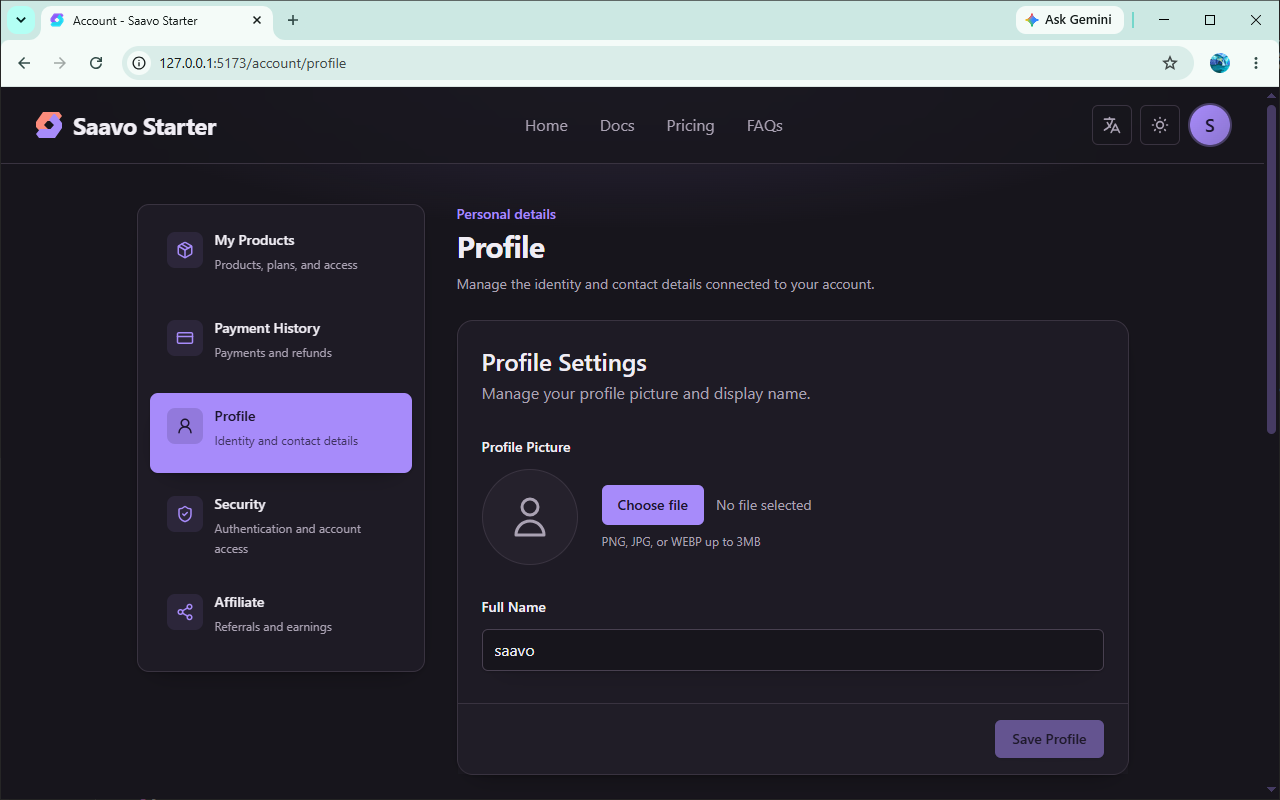
During local development, Wrangler provides R2 to the application through the MAIN_R2 binding. If uploads fail, check the binding and development server logs before investigating business code.
Configure file storage
Upload settings are grouped under upload in config/deploy.ts. Adjust them for your storage backend and upload requirements.
upload: {
    maxSize: 5 * 1024 * 1024,
    delivery: {
        proxyPath: '/uploaded',
        cache: {
            public: 'public, max-age=31536000, immutable',
        },
    },
    storage: {
        default: 'r2',
        kv: {
            defaultTTL: false,
        },
        r2: {
            publicBaseUrl: false,
        },
    },
}
Change these fields in config/deploy.ts. Change bucket and KV IDs in wrangler.jsonc, as described in the next section.
Before launch, address the following:
maxSize: The global limit foruploadFileOrThrow, 5 MiB by default. Set it to the largest file your product allows. Ticket and notification images have their own smaller limits. Raising this value does not automatically relax those business limits.proxyPath: Keep/uploadedunless you have a specific reason to change it. The Worker automatically mounts the read route using this value, so no change tosrc/pages/routes.tsxis needed. Changing the prefix does not update old URLs already stored in the database or rich text.publicBaseUrl: Defaults tofalse, meaning the application generates only Worker URLs. Set a URL only after binding and enabling an R2 Custom Domain. This setting does not disable existingr2.devor custom domains in Cloudflare.
storage.default determines whether all regular uploads use KV or R2. Individual upload endpoints cannot override it. The default is r2, so built-in avatar, ticket image, and notification image uploads all write to R2.
With KV selected, set a default TTL through storage.kv.defaultTTL or a file-specific lifetime through expiresIn for an individual upload. R2 has no automatic per-object deletion: when expiresIn is passed, the Worker refuses proxy reads after expiration, but the object remains in the bucket. You need a separate cleanup task to remove it.
Prepare storage services
In production, you must replace MAIN_R2 and MAIN_KV in wrangler.jsonc with a bucket and KV namespace in your own account. The prefilled repository IDs are template examples. They are invalid for deployment to your account or point to someone else's resources.
Default uploads write to MAIN_R2. You still need your own MAIN_KV, because ticket bodies, logs, and other content use it. Regular uploads write to MAIN_KV only after you change storage.default to kv.
To have the application return public R2 URLs in production, bind a custom domain and confirm that HTTPS works, then set storage.r2.publicBaseUrl. Keep it false if public URLs are not needed. To make the bucket actually stop being public, also disable r2.dev and remove custom domains in Cloudflare R2.
Local development uploads can use the Worker's MAIN_R2 binding. Regular form uploads need no R2 Access Key. Configure R2_ACCOUNT_ID, R2_ACCESS_KEY_ID, and R2_SECRET_ACCESS_KEY only when issuing temporary upload or download URLs.
An incorrect MAIN_R2 configuration causes avatar, ticket image, and notification image uploads or reads to fail. An incorrect MAIN_KV configuration does not affect default R2 uploads, but causes problems with KV data such as ticket bodies and logs.
Store and retrieve files in business code
Implement business uploads in authenticated, authorized APIs using the shared function:
import { resolveFetchWorkerCtx } from '@/ctx';
import { uploadFileOrThrow, purgeFileOrThrow } from '@/libs/storage';

const ctx = resolveFetchWorkerCtx(c);
const uploaded = await uploadFileOrThrow(ctx, {
    file,
    path: `user/${userId}`,
    name: 'photo.png',
});
The default return value is a relative /uploaded/{key} URL. Pass urlMode: 'absolute' if your business code needs an absolute URL.
In production, permanent R2 objects use the public URL when publicBaseUrl is configured. Temporary objects must pass the Worker's expiration check, so they still use an absolute /uploaded/{key} URL on the current site. Callers cannot enable public R2 access themselves.
To delete an object:
await purgeFileOrThrow(ctx, {
    store: uploaded.store,
    key: uploaded.key,
});
Generate temporary upload and download URLs
uploadFileOrThrow sends the file to the Worker before writing it to storage. For larger files, or objects that should not be publicly readable through /uploaded, you can issue short-lived R2 presigned URLs so the browser or caller reads and writes directly to the bucket.
These functions are in src/libs/utils/r2-presigned-url.ts:
createR2TemporaryUploadUrl: Issues a PUT upload URLcreateR2TemporaryDownloadUrl: Issues a GET download URL
They are not built-in HTTP routes. Call them from your own authenticated API and return the result to the frontend. URLs point to *.r2.cloudflarestorage.com and use neither /uploaded nor publicBaseUrl.
Signing requires R2 S3 API credentials read from the Worker environment. Do not return them to the frontend:
const credentials = {
    accountId: workerCtx.env.R2_ACCOUNT_ID,
    bucketName: workerCtx.env.R2_BUCKET_NAME,
    accessKeyId: workerCtx.env.R2_ACCESS_KEY_ID,
    secretAccessKey: workerCtx.env.R2_SECRET_ACCESS_KEY,
};
R2_BUCKET_NAME is in vars in wrangler.jsonc. Put the other three values in .env / Cloudflare Secrets, using the field names from example.vars. The signing functions throw if credentials are missing or malformed. expiresInSeconds must be an integer from 1 to 604800, in seconds: a minimum of 1 second and a maximum of 7 days.
The signing functions do not apply upload.maxSize or the MIME allowlist. Before signing, your API must check sign-in, authorization, path, type, and size. key must not start with / or contain ...
Temporary upload URLs
PUT URLs sign headers for file size, Content-Type, and SHA-256, and include if-none-match: * to prevent overwriting an existing object with the same name. sha256 must be 64 lowercase hexadecimal characters.
import { createR2TemporaryUploadUrl } from '@/libs/utils/r2-presigned-url';

const upload = await createR2TemporaryUploadUrl({
    ...credentials,
    key: `user/${userId}/photo.png`,
    expiresInSeconds: 600,
    contentType: 'image/png',
    sizeBytes: fileSize,
    sha256: fileSha256Hex,
});
Return method, url, and headers to the frontend. The client must send a PUT request using the returned headers unchanged, with the file itself as the body:
await fetch(upload.url, {
    method: upload.method,
    headers: upload.headers,
    body: file,
});
Direct browser uploads also require CORS on the R2 bucket, allowing PUT from your site's origin and permitting the signed headers. Server-side PUT requests do not require CORS.
Temporary download URLs
GET URLs bind only the object key and expiration time, making them suitable for short-lived downloads of private objects. Anyone with the URL can read the object before expiration, so keep the TTL as short as possible.
import { createR2TemporaryDownloadUrl } from '@/libs/utils/r2-presigned-url';

const download = await createR2TemporaryDownloadUrl({
    ...credentials,
    key: `user/${userId}/photo.png`,
    expiresInSeconds: 60,
});
The client can send a GET request to download.url without additional headers.
File paths must not contain ... Return a file proxy path, a configured public R2 URL, or one of these short-lived URLs to the frontend. Do not expose internal object keys directly. Account-level storage credentials must also stay on the server, never returned to the frontend or written in public documentation.
Ticket image uploads provide a complete implementation example you can follow. Reuse the existing authentication and permission controls when adding uploads. Do not create a separate generic upload endpoint that bypasses these checks.
Pre-launch checks
Storage directly affects user content. Before launch, you should confirm at least the following:
-
MAIN_R2/MAIN_KVuse your own Cloudflare resources. - If R2 is not public,
storage.r2.publicBaseUrlremainsfalse, andr2.devand custom domains are also disabled in Cloudflare. - Avatar or business uploads succeed and are accessible through
/uploadedor the configured public R2 URL. - Files exceeding
maxSizeor using HTML / JS / SVG are rejected. - The deletion flow actually removes objects.
- Upload endpoints require sign-in and allow writing only to the current user's own paths.
- If temporary URLs are used, the three R2 Secrets are configured, the issuing endpoint is authenticated and authorized, and only
urland required headers are returned to the frontend.
You should perform a real upload with an ordinary account rather than only mocking File objects locally.
Frequently asked questions
Next steps
Choose further reading based on what you need to build:
- Build a business endpoint for uploads → From a business table to a user data API
- See how tickets store images → Tickets and support
- Configure Cloudflare resources → Create Cloudflare resources
For most products, completing this chapter only requires switching to your own bucket. Configure a separate file domain if you actually need direct public R2 access.
To receive business files, call uploadFileOrThrow in a protected API. For direct uploads or private downloads, add an endpoint that issues temporary URLs.