Uses Resend by default, with Cloudflare Email as an alternative. Authentication emails are built in. Use emailService and existing templates for new business emails.
The Saavo template provides a shared email service and a set of authentication email templates. Signup verification, password recovery, email address changes, and two-factor authentication changes all send through the same service.
When developing your own product, you usually do not need to call email provider SDKs such as Resend or Cloudflare directly from pages or business code. Choose an email provider, configure sender details, and send through emailService. Local development does not send real email. It prints the content to the console for debugging.
Available features
After template initialization, the following email features are available out of the box:
| Feature | Default | Description |
|---|---|---|
| Email provider | Resend | config/deploy.ts → emailProvider.type |
| Sender | config/base.ts → fromEmailAddress | Display name and address |
| Reply-to address | supportEmail | Used when users reply |
| Local development sending | Console preview | Does not invoke a real transport |
| Sending rate limit | 5 emails per recipient address per day | Exceeding the limit fails in production |
Registered templates and their current triggers:
| Template | Current purpose |
|---|---|
register | Post-signup verification email, triggered by the signup Reaction |
verifyEmail | Email verification |
accountVerification | Account verification for highly sensitive operations |
passwordReset | Password reset |
emailChanged | Security notification for an email address change |
twoFactorSecurityChanged | Security notification after a two-factor authentication settings change |
welcome | Welcome email after successful signup, currently unused |
Business code sends through emailService in src/core/services/email. Do not use a third-party email SDK directly in page components.
Try sending email first
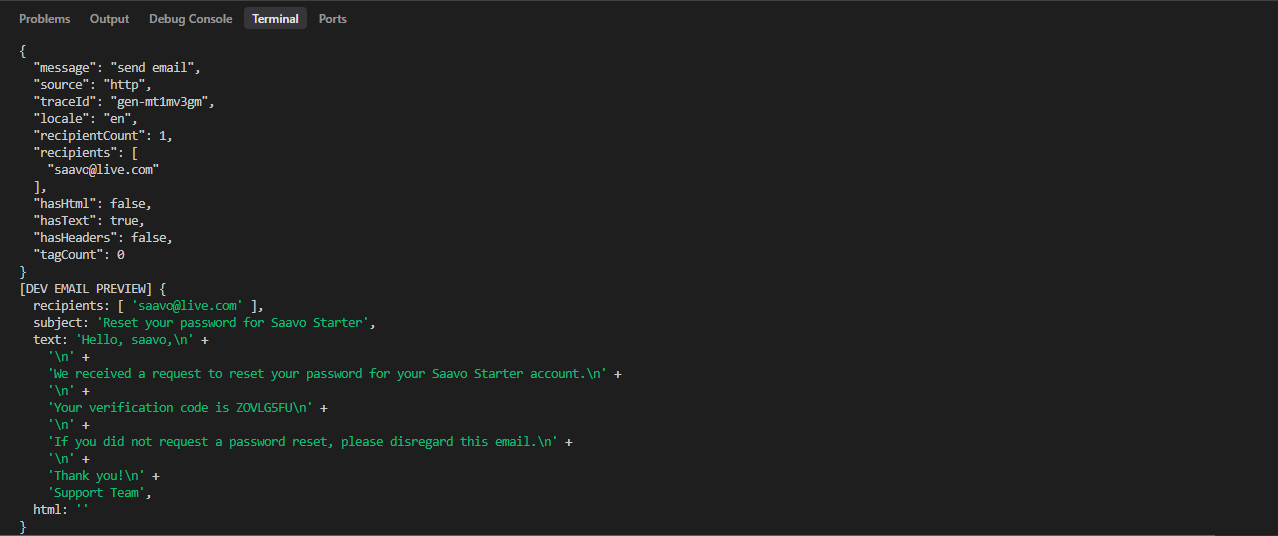
Register an account with the default configuration. The development server console shows a log like this:
[DEV EMAIL PREVIEW] {
  recipients: [ 'you@example.com' ],
  subject: '...',
  text: '...Your verification code is ...'
}
Use the code in the log to verify the email address, following the same flow described in the authentication documentation.
Only production or preview environments send real email. In development mode, reaching the sending rate limit only writes a log, and the preview flow still completes.
Important
Before requiring email verification, you must confirm that production can send real email. Otherwise, new users will be stuck at the verification step.
Configure email
Choose a provider
Default:
emailProvider: {
    type: 'resend',
}
Resend is the template's current default. You also need to configure RESEND_API_KEY in production and verify the domain.
To use Cloudflare Email:
emailProvider: {
    type: 'cloudflare',
}
Cloudflare Email uses the send_email binding named EMAIL in wrangler.jsonc. Before switching, confirm that your Cloudflare account has permission to send email to real users.
Change the sender
fromEmailAddress: {
    name: 'Acme',
    email: 'noreply@your-domain.com',
},
supportEmail: 'support@your-domain.com',
The production From address must belong to a domain allowed by the email provider and match the configured address here. Sender details and the reply-to address are global settings shared by all emails.
Adjust sending rate limits
spam: {
    resourceProtection: {
        emailSendService: {
            lifetimeDuration: '1d',
            maxEmailsPerUser: 5,
            idleTimeout: '2d',
        },
    },
}
This protection counts messages per recipient email address. It is not a marketing email quota. Authentication emails are also subject to it. Do not set a very high production limit for testing convenience, as this may affect real users.
Prepare the email service
Cloudflare Email requires a sending domain configured in Cloudflare and a Worker binding. Resend requires an API key and a verified domain. Local email previews work without these settings, but you must send a real email from a non-development environment before making the product public.
For key and domain configuration, see:
Send email from business code
New business emails should reuse emailService rather than introducing another SMTP client.
An existing method:
import emailService from '@/core/services/email';

await emailService.sendVerifyEmail(c, {
    email: user.email,
    name: user.displayName ?? user.userName,
    verification: { type: 'code', code },
});
Other methods include sendRegisterEmail, sendForgotPasswordEmail, and sendAccountVerificationEmail. The generic entry point accepts WorkerCtx:
await emailService.send(workerCtx, templateKind, email, data)In HTTP requests, use resolveFetchWorkerCtx(c) to obtain WorkerCtx. Do not pass the Hono context directly to the generic send.
For a new use case, reuse an existing template or:
- Add a template in
src/libs/email/template - Register it in
EMAIL_TEMPLATESinfactory.ts - Wrap it in a clearly named
send*method
For business workflows that may retry, you should prefer SendEmailCommand in Reaction to better handle repeated execution and asynchronous delivery. Call emailService directly only when the current request must immediately obtain the sending result.
Built-in templates currently output plain text by default. The email service and both the Resend and Cloudflare adapters support an html field. For HTML email, generate and return HTML from the template while keeping the plain-text content.
Pre-launch checks
Email affects critical flows such as signup and password recovery. Before launch, you should confirm at least the following:
-
fromEmailAddressandsupportEmailuse your own addresses. - Production
emailProvider.typematches the actual credentials. - The sending domain is verified in Cloudflare or Resend.
- A real signup or verification email sent with production configuration arrives in the inbox.
- If email verification is required, users who do not receive the email cannot continue using the product. Reliable sending must be established first.
- Sending rate limits take effect when endpoints are abused.
Do not substitute development console previews for production email tests.
Frequently asked questions
Next steps
Choose further reading based on what you need to build:
- Configure authentication emails → Authentication and accounts
- Send business emails asynchronously → Background jobs
- See how a real product configures branding and email → WebpageToPDF tutorial
- Set up Resend → Configure Resend
For most products, completing this chapter only requires choosing an email provider and verifying the domain.
Add new product emails using the existing template pattern instead of calling email SDKs directly from pages.