Define plans and integrate entitlements
Configure the free and Pro plans, user quotas, pricing page, and permission checks.
The previous article migrated the core conversion features. This article defines usage rules for free and Pro users, connecting plans, entitlement grants, quota consumption, and permission checks. Actual payments will be integrated in the next article.
Paid plans and the pricing page
WebpageToPDF has three core features. Quick Convert and Custom are free. Visual Editor requires sign-in and offers one free trial use, after which users need Pro. I plan to offer a paid membership at $5.99 per month or $49.99 per year.
API conversion is outside the first-release scope, but we will define its billing and entitlements now so the entire product model will not need to change when it becomes available. The API entry point and credit packs will remain hidden in the first release. We will define the monthly API quota reset rules for members in advance, ready for use when the API launches. Monthly included credits do not carry over. The overall entitlements are:
| Feature | Free | Pro | API credit packs (available later) |
|---|---|---|---|
| Quick / Custom web conversion | Basic quota | Higher quota | No effect |
| Visual Editor | One trial use after sign-up | Full access | No effect |
| All web settings | ✓ | ✓ | No effect |
| API Key | Trial key | ✓ | ✓ |
| Included API credits | One-time trial credits | Granted automatically each month | Increased after purchase |
| API concurrency | 1 | 1 | No increase by default |
| Priority processing | ✓ | Can depend on the API plan | |
| Balance reset | Trial credits do not reset | Monthly included credits reset each month | Purchased credits do not reset |
| After canceling membership | Account retained | Pro web entitlements lost | Purchased credits remain usable |
This is the result of my discussion with AI. It may change later, but the general direction should remain the same.
With the basic commercial model established, the next step is to map these entitlements to plans and prices. I intend to impose limits in two ways:
- User roles: By default, free users can use free features a limited number of times, and you can prompt them to sign up. This is for tracking and limiting usage, rather than saving resources.
- User entitlements: The core quotas measure session duration for web conversion and conversion count for the API.
Web permissions are restricted by user role. Free users' endpoint calls are limited by IP/Anonymous ID. Web conversion also has a daily quota based on session duration: anonymous usage is tracked separately, while signed-in users receive a daily-reset quota through entitlement configuration. The API endpoints are separate and limited only by credits, which reset monthly for members.
Define capabilities and entitlements
With those relationships established, add two capabilities to config/capability.ts:
web: {
    convert: {
        type: CapabilityType.Numeric,
        description: {
            value: 'Web conversion session time measured in seconds',
            key: 'components.billing.entitlements.webConversionSeconds.capabilityDescription',
        },
    },
},

api: {
    convert: {
        type: CapabilityType.Numeric,
        description: {
            value: 'Credits available for successful API conversions',
            key: 'components.billing.entitlements.apiConversionCredits.capabilityDescription',
        },
    },
},
Based on these capabilities, I estimated the following quotas by role:
web.convert:
| User tier | Registered-user base quota | Quota added by this tier | Total daily quota | At 30 seconds per conversion |
|---|---|---|---|---|
| Anonymous user | — | Separate 600-second limit | 600 seconds / 10 minutes | About 20 conversions |
| Registered user | 1,800 seconds | No additional quota | 1,800 seconds / 30 minutes | About 60 conversions |
| Pro user | 1,800 seconds | 1,800 additional seconds | 3,600 seconds / 60 minutes | About 120 conversions |
Anonymous limits are handled separately from signed-in user entitlements. The anonymous 600-second quota is tracked independently and does not count toward a signed-in user's entitlements. Signing up grants 1,800 seconds per day. Pro users keep that registration entitlement and receive another 1,800 seconds per day through membership, for a total of 3,600 seconds. After cancellation takes away Pro entitlements, only the membership's additional quota is removed. The registration entitlement remains. The configuration examples below follow this rule.
api.convert:
| User/product | API credits added by this tier | Reset behavior |
|---|---|---|
| Anonymous user | 0 | — |
| Registered user | +10 | One-time grant at sign-up |
| Pro monthly | +500 | Reset monthly |
| Pro yearly | +500 | Reset monthly |
| 500-credit pack | +500 | Never expires |
| 2,000-credit pack | +2,000 | Never expires |
| 10,000-credit pack | +10,000 | Never expires |
Keep the default role definitions. Next, edit entitlements.ts to define entitlements based on the tables above.
export const websiteEntitlementDefinitions = {
  web_conversion_seconds: {
    name: {
      value: 'Web conversion time',
      key: 'components.billing.entitlements.webConversionSeconds.name',
    },
    description: {
      value: 'Daily web conversion allowance measured in browser session seconds.',
      key: 'components.billing.entitlements.webConversionSeconds.description',
    },
    capabilities: [
      'web.convert',
    ],
  },
  api_conversion_credits: {
    name: {
      value: 'API conversion credits',
      key: 'components.billing.entitlements.apiConversionCredits.name',
    },
    description: {
      value: 'Credits consumed by successful API conversions.',
      key: 'components.billing.entitlements.apiConversionCredits.description',
    },
    capabilities: [
      'api.convert',
    ],
  },
} as const satisfies WebsiteEntitlementDefinitionsInput;
Configure products and plans
The full configuration below makes it easier to compare monthly plans, annual plans, and credit packs. API credit packs are not available yet, so their plans retain disabled: true.
Next, define the products in products.ts, creating the plans, prices, and entitlements described above.
export const websiteProductDefinitions = {
pro: {
name: {
value: 'Webpage to PDF Pro',
key: 'components.billing.product.name',
},
description: {
value: 'A full 60 minutes of webpage conversion time every day—twice the free account allowance.',
key: 'components.billing.product.description',
},
plans: {
license: {
type: 'recurring',
interval: 'month',
intervalCount: 1,
priceId: 'price_xxxxxxxxxxxxxxxxxxxxx',
allowRepurchase: false,
disabled: false,
salePrice: '$5.99',
billingLabel: {
value: '/month',
key: 'components.billing.period.month',
},
title: {
value: 'Pro',
key: 'components.billing.pro.name',
},
description: {
value: 'Double the daily conversion time of a free account to a full 60 minutes.',
key: 'components.billing.pro.planDescription',
},
features: [
{
value: 'A full 60 minutes of webpage conversion time per day',
key: 'components.billing.pro.features.dailyConversionTime',
},
{
value: 'Twice the free account daily allowance',
key: 'components.billing.pro.features.doubleAllowance',
},
{
value: 'Quick, Custom, and Visual conversion included',
key: 'components.billing.pro.features.allModes',
},
{
value: 'Failed conversions do not use conversion time',
key: 'components.billing.pro.features.failedJobs',
},
],
access: {
roles: ['premium'],
entitlements: [
{
target: 'web_conversion_seconds',
config: {
kind: 'numeric',
unitLimit: 1800,
scaling: 'fixed_amount',
reset: {
alignment: 'calendar',
interval: 'day',
count: 1,
},
rollover: false,
quotaUsedResetMode: 'clear',
},
},
{
target: 'api_conversion_credits',
config: {
kind: 'numeric',
unitLimit: 500,
scaling: 'fixed_amount',
reset: {
alignment: 'calendar',
interval: 'month',
count: 1,
},
rollover: false,
quotaUsedResetMode: 'clear',
},
},
],
},
default: true,
recommended: true,
},
yearly: {
type: 'recurring',
interval: 'year',
intervalCount: 1,
priceId: 'price_xxxxxxxxxxxxxxxxxxxxy',
allowRepurchase: false,
disabled: false,
salePrice: '$49.99',
billingLabel: {
value: '/year',
key: 'components.billing.period.year',
},
valueHint: {
value: 'Save 30% with annual billing',
key: 'components.billing.yearlyValueHint',
},
title: {
value: 'Pro',
key: 'components.billing.pro.name',
},
description: {
value: 'Double the daily conversion time of a free account to a full 60 minutes.',
key: 'components.billing.pro.planDescription',
},
features: [
{
value: 'A full 60 minutes of webpage conversion time per day',
key: 'components.billing.pro.features.dailyConversionTime',
},
{
value: 'Twice the free account daily allowance',
key: 'components.billing.pro.features.doubleAllowance',
},
{
value: 'Quick, Custom, and Visual conversion included',
key: 'components.billing.pro.features.allModes',
},
{
value: 'Failed conversions do not use conversion time',
key: 'components.billing.pro.features.failedJobs',
},
],
access: {
roles: ['premium'],
entitlements: [
{
target: 'web_conversion_seconds',
config: {
kind: 'numeric',
unitLimit: 1800,
scaling: 'fixed_amount',
reset: {
alignment: 'calendar',
interval: 'day',
count: 1,
},
rollover: false,
quotaUsedResetMode: 'clear',
},
},
{
target: 'api_conversion_credits',
config: {
kind: 'numeric',
unitLimit: 500,
scaling: 'fixed_amount',
reset: {
alignment: 'calendar',
interval: 'month',
count: 1,
},
rollover: false,
quotaUsedResetMode: 'clear',
},
},
],
},
recommended: true,
},
},
},
api_credits: {
name: {
value: 'API conversion credits',
key: 'components.billing.api.productName',
},
description: {
value: 'One-time credit packs for additional successful API conversions.',
key: 'components.billing.api.productDescription',
},
plans: {
credits_500: {
type: 'one-time',
priceId: 'price_xxxxxxxxxxxxxxxxxxxxz1',
allowRepurchase: true,
disabled: true,
salePrice: '$5',
access: {
entitlements: [
{
target: 'api_conversion_credits',
config: {
kind: 'numeric',
unitLimit: 500,
scaling: 'per_unit',
},
},
],
},
title: {
value: '500 credits',
key: 'components.billing.api.packs.credits500.name',
},
description: {
value: 'For prototypes and occasional API jobs.',
key: 'components.billing.api.packs.credits500.description',
},
features: [{
value: '500 successful API conversions',
key: 'components.billing.api.packs.credits500.feature',
}],
},
credits_2000: {
type: 'one-time',
priceId: 'price_xxxxxxxxxxxxxxxxxxxxz2',
allowRepurchase: true,
disabled: true,
recommended: true,
salePrice: '$15',
access: {
entitlements: [
{
target: 'api_conversion_credits',
config: {
kind: 'numeric',
unitLimit: 2_000,
scaling: 'per_unit',
},
},
],
},
title: {
value: '2,000 credits',
key: 'components.billing.api.packs.credits2000.name',
},
description: {
value: 'For regular integrations and growing workloads.',
key: 'components.billing.api.packs.credits2000.description',
},
features: [{
value: '2,000 successful API conversions',
key: 'components.billing.api.packs.credits2000.feature',
}],
},
credits_10000: {
type: 'one-time',
priceId: 'price_xxxxxxxxxxxxxxxxxxxxz3',
allowRepurchase: true,
disabled: true,
salePrice: '$59',
access: {
entitlements: [
{
target: 'api_conversion_credits',
config: {
kind: 'numeric',
unitLimit: 10_000,
scaling: 'per_unit',
},
},
],
},
title: {
value: '10,000 credits',
key: 'components.billing.api.packs.credits10000.name',
},
description: {
value: 'For production services with sustained demand.',
key: 'components.billing.api.packs.credits10000.description',
},
features: [{
value: '10,000 successful API conversions',
key: 'components.billing.api.packs.credits10000.feature',
}],
},
},
},
} as const satisfies Record<string, ProductConfig>;Configure anonymous limits and registration entitlements
The paid model now defines its permissions and entitlements. Registered and anonymous users still need their own rules.
Anonymous users have no userId, so user roles and entitlements cannot restrict them directly. In an actual project, you can combine IP addresses with Saavo's Anonymous ID to limit call frequency and usage quotas. Anonymous ID only helps identify a browser. It is not a reliable user identity. How strict the limits should be depends on product costs and abuse patterns. This tutorial does not go into the implementation details.
For registered users, my initial plan is to assign the register role and grant a daily quota and one-time API credits. To implement this, open src/core/reaction/events/signup.ts and add the logic to the sign-up event. The default code is:
export const UserSignupEvent = defineEvent<
    'user_signed_up',
    UserSignupEventData
>({
    type: 'user_signed_up',
    trigger: (_ctx, event) => {
        return [
            ...(event.payload.roles?.length ? [GrantRoleCommand.create({
                key: 'init_signup_user_role',
                payload: {
                    subject: event.subject,
                    sourceType: event.payload.sourceType,
                    sourceKey: event.payload.sourceKey,
                    roles: event.payload.roles,
                },
            })] : []),

            ...(event.payload.register ? [SendEmailCommand.create({
                key: 'send_registration_email',
                payload: {
                    templateKind: 'register',
                    ...event.payload.register,
                },
            })] : []),
        ];
    },
});
This code is straightforward. When a user triggers the signup event, the system executes two commands in sequence: initialize the user roles and send the registration email.
To grant additional entitlements and API credits after a successful sign-up, add the corresponding command here. For example:
GrantEntitlementCommand.create({
    key: 'init_signup_user_entitlements',
    payload: {
        subject: event.subject,
        sourceType: event.payload.sourceType,
        sourceKey: event.payload.sourceKey,
        entitlements: [
            {
                target: 'web_conversion_seconds',
                config: {
                    kind: 'numeric',
                    unitLimit: 1_800,
                    scaling: 'fixed_amount',
                    reset: {
                        alignment: 'calendar',
                        interval: 'day',
                        count: 1,
                    },
                    rollover: false,
                    quotaUsedResetMode: 'clear',
                    description: 'Registered user daily web conversion allowance',
                },
            },
            {
                target: 'api_conversion_credits',
                config: {
                    kind: 'numeric',
                    unitLimit: 10,
                    scaling: 'fixed_amount',
                    description: 'One-time API credits for registration',
                },
            },
        ],
    },
}),
This completes the configuration for granting registered users entitlements and API credits. If you are concerned about users entering arbitrary email addresses to repeatedly claim resources, you can move this logic to the email verification (user_email_verified) event.
Note
Remember to update affiliate.ts as well. It uses the entitlement definitions from entitlements.ts.
Roles, entitlements, and their automatic assignment rules are now defined. After users sign up or purchase a product, the system will assign roles and entitlements according to the configuration and create the corresponding database records. No manual handling is needed.
Create the pricing page
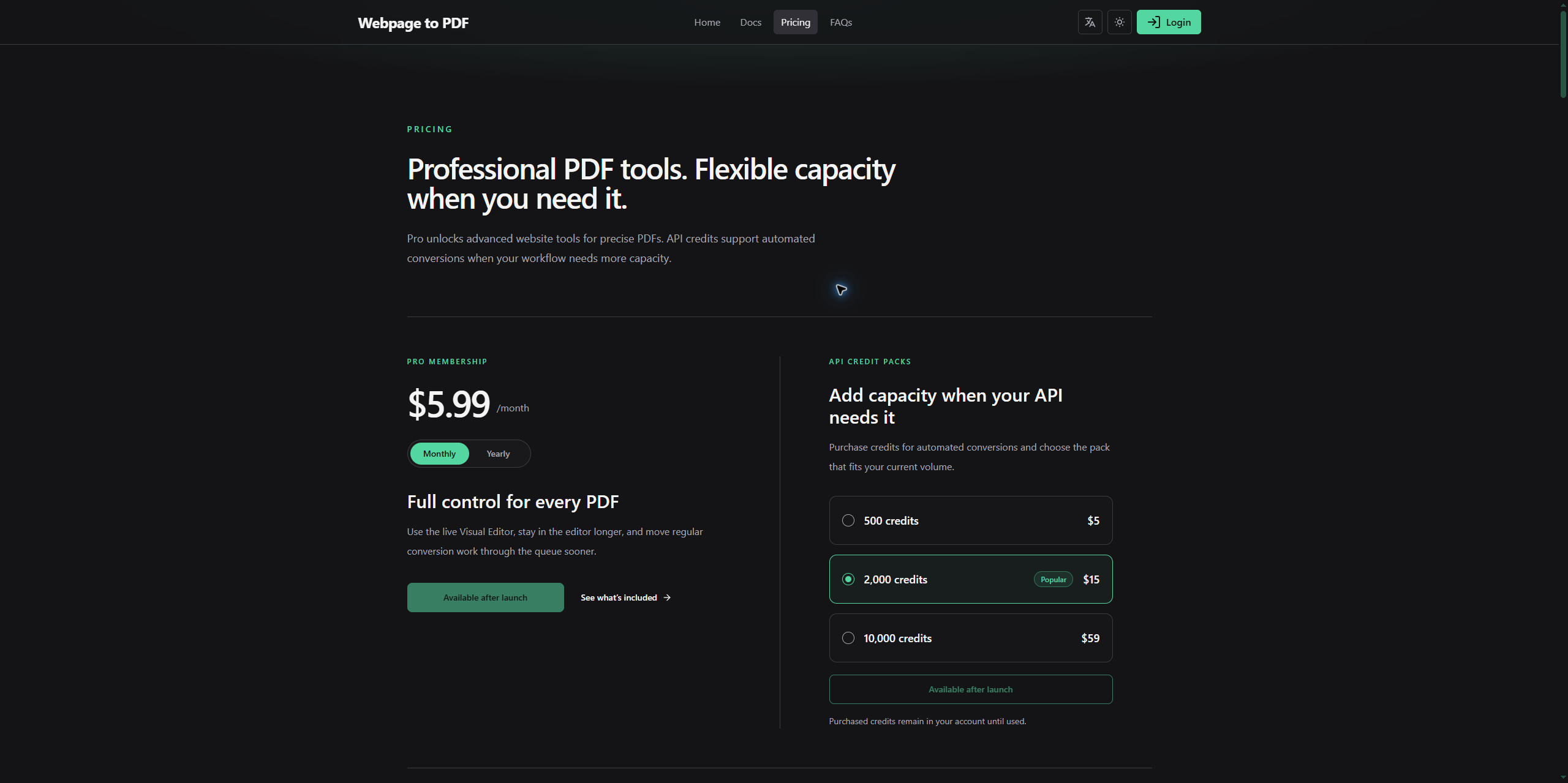
Next, ask AI to build a Pricing page from the product definitions. This is the prompt I used:
Using the existing product configuration in
config/products.ts, create a standalone Pricing page that clearly presents Pro membership plans, credit packs, and the full entitlement differences between free users and members. Use the existing API feature flag to determine whether to show API entitlements and credit purchases.
After several rounds of adjustments, the page looks like this:
Integrate entitlements and permissions
The configuration in the previous section lets the system automatically assign roles and entitlements in response to actions such as sign-up and purchases.
So far, though, we have only implemented assignment. Quota consumption and permission checks are still missing. Both are common in SaaS products, especially for paid features, usage counts, and API quotas.
This section builds on the configuration above to implement quota consumption and permission checks.
Consume quota
Quota consumption primarily applies to Numeric entitlements. When a user uses a feature, the corresponding amount must be deducted from their current entitlement quota.
Credits are a common example. Each use of a feature consumes a certain number of credits, reducing the remaining balance.
The project currently defines two Numeric quotas: web_conversion_seconds and api_conversion_credits.
web_conversion_secondsrepresents web conversion time. Using web conversion deducts time from this quota based on actual usage.api_conversion_creditsrepresents API credits. Converting through the API consumes the corresponding number of credits.
Saavo already provides quota consumption in the repository layer through consumeQuotaBySubject. It deducts a specified amount for a user and an entitlement/capability without requiring the caller to know which entitlement records hold the quota.
As mentioned earlier, entitlement records use an additive model. A user may have several quota records, potentially with different priorities. Keep this in mind if you implement quota consumption yourself. In general, using Saavo's built-in consumeQuotaBySubject is recommended.
This is a repository-layer method, so you need to implement the corresponding business logic in the service layer. Call it as follows:
const result = await userEntitlementCapabilityRepo.consumeQuotaBySubject(
    ctx,
    {
        subject: subjectOfUser(userId),
        capabilityKey: 'web.convert',
        amount: 35,
        eventType: 'consume',
        reason: 'Webpage conversion',
        metadata: { taskId },
    },
    additionalStatements,
);
The parameters are:
| Parameter | Meaning |
|---|---|
subject | The subject whose quota is consumed, such as { type: 'user', id: '7' } |
capabilityKey | Find quota by capability, such as web.convert |
entitlementKey | Find quota by entitlement |
amount | Requested amount to consume, which must be a safe integer greater than 0 |
eventType | Quota event type, such as consume |
reason | Reason for consumption |
metadata | Additional data, such as taskId |
additionalStatements | Other D1 statements to execute atomically with quota consumption |
Provide at least one of capabilityKey and entitlementKey. If both are provided, both must match.
The function works as follows:
- Find all valid Numeric quotas for the user.
- Consume them in priority DESC, id ASC order.
- Continue to the next quota record if one is insufficient.
- Write capability_quota_event records alongside consumption.
- Execute the quota event records, quota updates, and additional statements in a single D1 batch.
The function returns a result like this:
{
    requested: 35, // Requested amount
    consumed: 30,  // Amount consumed
    remaining: 0,  // Remaining quota
    debt: 5,       // Amount that could not be consumed
}
If the remaining quota is insufficient, the system does not throw an “insufficient quota” exception. It consumes all remaining quota and returns the shortfall in debt.
It throws only for invalid parameters, failed database operations, or inconsistencies between quota updates and event records.
Check permissions
Permission checks are straightforward, but what you need to check varies by business scenario. Common checks include sign-in status, user roles, entitlements, remaining quota, and specific capabilities.
In most cases, keep permission design as simple as possible:
- For features available only to registered users, check sign-in status.
- For fixed permissions such as administration, check user roles.
- For paid features, check whether the user has the corresponding entitlement.
- If multiple roles or entitlements can provide the same business capability, you can check the capability.
- For features limited by usage count, credits, or duration, also check and consume quota in the Service layer.
In this example, Quick Convert and Custom are available to everyone. Visual Editor requires sign-in. Registered users can try it once, and further use requires Pro entitlements. The API is not available in the first release. Once enabled later, access will depend on the user's credit balance.
You can implement this by checking user roles and entitlements in API endpoints. For example:
import { authenticatedGuard } from '@/core/services/auth/guards/authenticated';
import type { Ctx } from '@/types';

export function createVisualAuthenticationMiddleware() {
    return async (c: Ctx, next: () => Promise<void>) => {
        const authenticated = authenticatedGuard(c);

        if (!authenticated.success) {
            return c.json(
                authenticated,
                c.get('saasAuthContext') ? 403 : 401,
            );
        }

        await next();
    };
}
This middleware only blocks anonymous access. After authentication passes, the Service layer still needs to check whether the user has a trial use remaining or has Pro entitlements. You can also put the authentication check at the entry point of the API route for the same effect.
To check whether a user has a specific role, use the following approach. This example allows only administrators to access an endpoint:
import { authz } from '@/authz';
import { gResultCode } from '@/errors';
import type { Ctx } from '@/types';

async function requireAdmin(c: Ctx, next: () => Promise<void>) {
    if (!await authz.hasRole(c, 'admin')) {
        return c.json({
            success: false,
            code: gResultCode.authRoleDenied,
            error: 'api.auth.roleDenied',
            retryable: false,
        }, 403);
    }

    await next();
}
The project also supports checking specific capabilities provided by roles:
const allowed = await authz.hasRoleCapability(
    c,
    'admin.user.manage',
);
Saavo exposes many similar methods through the authz object. Choose the one that fits your needs. If none is sufficient, you can ask AI to implement a custom check following this logic.
Checklist
By the end of this article, you should check permissions and daily quotas for anonymous, registered, and Pro users separately, and confirm that Visual Editor's one-time trial limit takes effect.
Tutorial overview · Previous: Migrate the PDF conversion features · Next: Integrate Stripe payments