OAuth2 authorization server
Let third-party applications request authorization from your users. This is different from signing in to your website with Google.
Saavo includes an OAuth 2.0 authorization server so you can build an open platform around your product. Third-party applications direct your users to sign in and grant authorization, then exchange an authorization code for an access token to call the APIs you expose.
This differs from social sign-in, such as signing in with Google. Social sign-in brings an external identity into your system. Saavo's authorization server lets external applications access your users' resources.
When using this feature, you need to validate requests in the APIs you expose, ensuring that token permissions are valid and within the allowed scopes.
Available features
After template initialization, the following features are available out of the box:
| Purpose | Default entry point | Default status |
|---|---|---|
| Authorization | /oauth/authorize | oauth2.enableService defaults to true |
| Continue after sign-in | /oauth/authorize/continue | Enabled |
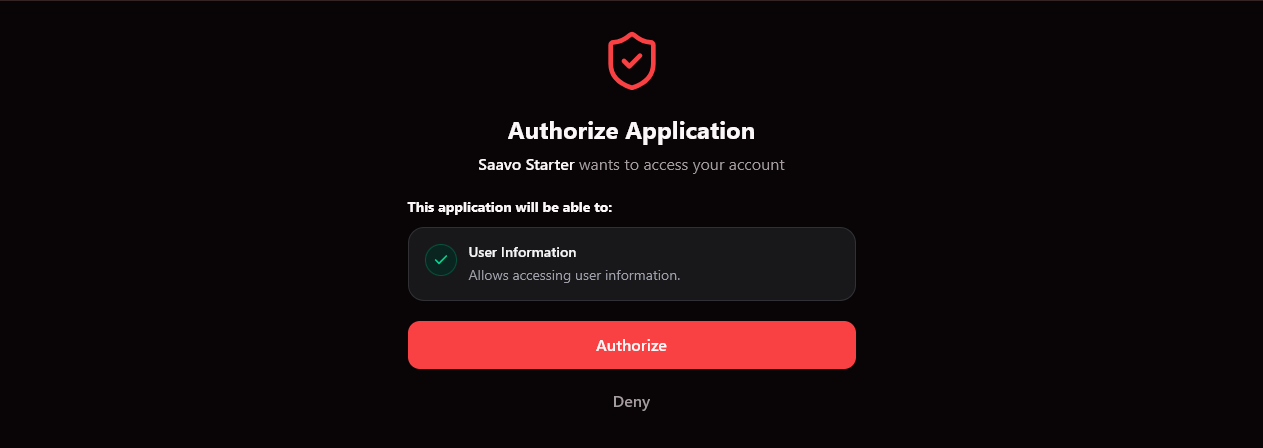
| Consent page | /oauth/authorize/consent | Enabled |
| Token exchange | POST /oauth/token | Mounted |
| Token revocation | POST /oauth/token/revoke | Mounted |
| Get user information after authorization | GET /oauth/current-user | Requires the user scope |
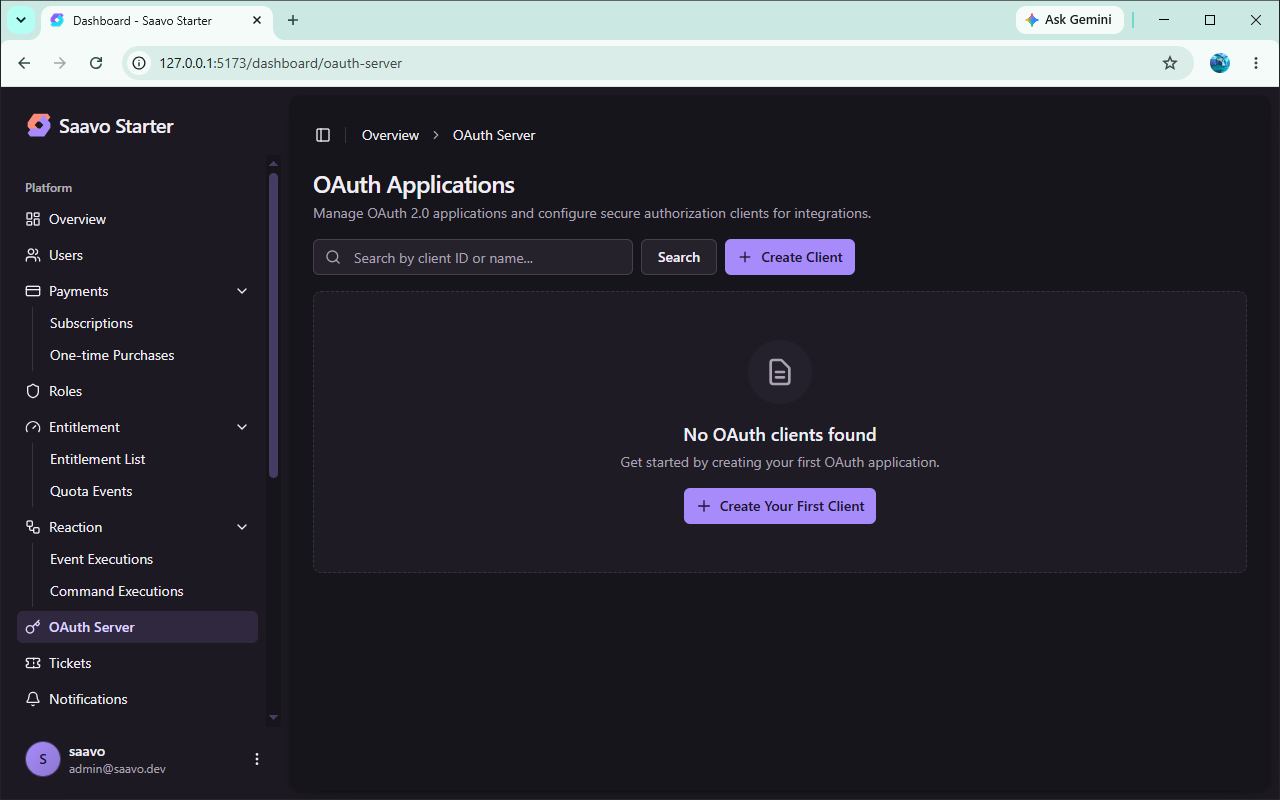
| Manage third-party clients | /dashboard/oauth-server | Administrators can create clients |
The template supports three grant types by default: authorization code, refresh token, and client credentials. The authorization code grant supports PKCE and requires the S256 method to generate the code challenge. When creating an OAuth client, administrators can configure redirect URIs and specify the grant types and scopes the client may use.
Default scopes are defined in config/scopes.ts:
| Scope | Meaning |
|---|---|
user | Access user information |
basic | Example basic access |
Roles describe the permissions a user holds. Scopes describe the operations an access token may perform. Even if the current user is an administrator, a third-party application's token may contain only the basic scope, limiting it to APIs allowed by that basic scope.
How this differs from Google sign-in
| Authorization server | Social sign-in | |
|---|---|---|
| Purpose | Third-party applications access your API | Users sign in to your website |
| Pages | /oauth/authorize* | /auth/login and others |
| Callback / token exchange | /oauth/token | /api/auth/oauth2/google, /github |
| Configuration | deploy.oauth2, scopes.ts | GOOGLE_* / GITHUB_* environment variables |
/api/auth/current-user reads the website session. /oauth/current-user reads a third-party application's access token. Do not use them interchangeably.
Try the authorization flow first
Even if your product does not currently provide third-party access, we recommend looking at the client management page in the dashboard. This avoids discovering after launch that the feature is enabled by default.
Complete an authorization code flow:
The administrator creates a client with a Redirect URI and allowed scopes
↓
The third-party application opens /oauth/authorize
↓
The user signs in if needed
↓
Confirm permissions on the consent page
↓
Return the authorization code
↓
POST /oauth/token exchanges the code for access and refresh tokens
By default, authorization codes are valid for 15 minutes, access tokens for 1 day, and refresh tokens for 30 days. Refresh tokens rotate.
Tip
oauth2.enableService only determines whether authorization pages are available. APIs such as /oauth/token remain available when it is disabled. If your product does not currently provide third-party access, we recommend avoiding client creation and use of these tokens in your business APIs.
Configure the OAuth 2.0 authorization server
Configure the authorization server in the oauth2 section of config/deploy.ts and in config/scopes.ts.
Enable or disable the OAuth 2.0 service
Defaults:
oauth2: {
    enableService: true,
    issuer: 'saavo',
    requiresPKCE: true,
    requiresS256: true,
}
After initializing your product, we recommend changing issuer early. It is written into access token claims to identify the token issuer.
If your product does not need open platform capabilities, you can set enableService to false and avoid creating OAuth clients. This switch currently controls only whether the related pages are enabled. It does not stop the OAuth API itself.
To disable the authorization server completely, you also need to stop mounting the /oauth API routes.
Define scopes third parties can request
Add your scopes to config/scopes.ts with names and descriptions. This text appears on the consent page.
The permissions a third party receives are the intersection of the requested scopes and the scopes allowed for its client. Adding a scope to configuration is not enough. You also need to grant it to the corresponding client in the dashboard.
Configure upgrade prompts for scopes
config/upgrade.ts is an empty object by default. When users lack an entitlement, you can configure upgrade cards here so the consent page directs them to purchase a higher-tier plan.
Leave it empty if you do not need upgrades. Do not put billing logic in the authorization code token exchange endpoint.
Prepare the authorization service
Authorization code, access token, and refresh token signatures all depend on the SAAS_SECRET environment variable. Each environment should use a separate key. In particular, do not reuse a development or test environment's SAAS_SECRET in production.
A third-party client's redirect URI must exactly match the address registered in the admin dashboard. Since local development and production usually use different domains, you can create separate OAuth clients for each environment or configure multiple allowed redirect URIs for the same client.
Validate access tokens in business APIs
You only need to check OAuth tokens in business routes when you explicitly expose those APIs to third parties.
The basic principle for protecting resources is:
Check the token's scopes first, then check whether the user still holds a required role or entitlement as needed. Do not write the user's admin role into the token.
const result = await authz.authorizeOAuthRequest(c, {
    scope: 'basic',
});

if (!result.success) {
    return c.json(result, 401);
}
If the endpoint also requires the user to have purchased a product:
const result = await authz.authorizeOAuthRequest(c, {
    scope: 'user',
    entitlement: 'starter_download',
});
You can also use these methods individually:
await authz.hasScopes(c, 'user')
await authz.hasAnyScope(c, ['user', 'basic'])
When third-party applications access resources through OAuth2, expose only data that matches the current scope. The template's GET /oauth/current-user is only an example. Although it returns some user entitlement information after the user scope check passes, your resource endpoints should not simply copy all its fields. When exposing a production API, decide which user information, roles, or entitlements to share with third parties based on your business requirements.
OAuth2 primarily supports third-party clients accessing APIs. Your website's own pages and first-party APIs continue to use sessions and authenticatedGuard. They do not need to switch to bearer token authentication. These authentication methods address different scenarios, and mixing them is not recommended.
Tokens obtained with client_credentials do not represent a specific user, so they cannot rely on a user's roles, entitlements, or other personal state. They are better suited to machine access between services. These endpoints should decide access based solely on the token's scopes.
Tip
Only two grant types are recommended for SaaS applications: authorization code and client credentials. Other grant types have significant security weaknesses and are not recommended.
Pre-launch checks
The authorization server delegates user permissions to third parties. Before launch, we recommend checking at least the following:
-
issueruses your product's identifier. - Production uses a separate
SAAS_SECRET. - If you do not provide an open platform, no production clients have been created and authorization pages are disabled. If APIs must also be inaccessible, the
/oauthroutes are no longer mounted. - If you provide an open platform, sign-in, consent, token exchange, refresh, and revocation have been tested using authorization code + PKCE.
- Client redirect URIs point to production callbacks rather than local addresses.
- Business APIs check scopes rather than whether the user is an administrator.
- Tokens cannot obtain scopes that were not requested.
- Scope descriptions use your product's wording.
We recommend completing this flow with a dedicated test client. Do not substitute the website administrator's session for token testing.
Frequently asked questions
Next steps
Choose further reading based on what you need to build:
- Let users sign in with Google → Set up Google sign-in
- Restrict what users can do → Permissions and entitlements
- Recommend upgrades on the consent page → Payments and plans
- Manage OAuth clients → Admin dashboard
- Understand how authentication identifies the current user → Authentication and accounts
Most standalone SaaS products do not need to treat the authorization server as a core feature.
Use scopes to protect third-party APIs only when you actually need an open platform.