設計方案與串接使用權益
設定免費與 Pro 方案、使用者額度、定價頁面和權限檢查。
上一篇已移植核心轉換功能。這篇會設計免費與 Pro 使用者的使用規則,將方案、使用權益分配、額度扣除和權限檢查串接起來,實際付款則在下一篇處理。
付費方案與定價頁面
WebpageToPDF 有三種核心功能。Quick Convert 和 Custom 免費開放,Visual Editor 則要求先登入,可免費體驗一次,之後需要訂閱 Pro。我的構想是提供付費會員,分成每月 5.99 美元和每年 49.99 美元兩種方案。
API 轉換不屬於首版功能,不過這裡先設計好計費與使用權益,日後啟用時就不必調整整個產品模型。首版先隱藏 API 入口和點數包,預先定義會員每月重設的 API 額度規則,等 API 正式開放後即可使用。每月贈送的額度不跨月累積,整體使用權益如下:
| 項目 | Free | Pro | API 點數加值包(後續開放) |
|---|---|---|---|
| Quick / Custom 網頁轉換 | 基本額度 | 較高額度 | 不影響 |
| Visual Editor | 註冊後體驗一次 | 完整使用 | 不影響 |
| 所有網頁設定 | ✓ | ✓ | 不影響 |
| API Key | 試用 Key | ✓ | ✓ |
| API 贈送額度 | 一次性試用額度 | 每月自動發放 | 購買後增加 |
| API 同時執行數 | 1 | 1 | 預設不提高 |
| 優先處理 | ✓ | 可依 API 方案決定 | |
| 餘額重設 | 試用額度不重設 | 每月贈送額度按月重設 | 加值額度不重設 |
| 取消會員後 | 保留帳號 | 失去 Pro 網頁使用權益 | 已購買額度可繼續使用 |
這是我與 AI 討論後的結果,日後可能還會調整,但大致不會偏離這個方向。
確認基本商業架構後,接著拆解這些使用權益,分別對應到不同方案與價格。目前準備從兩方面限制:
- 第一,使用使用者角色。預設免費使用者只能使用一定次數的免費功能,藉此引導註冊。目的不是節省資源,而是方便統計與限制。
- 第二,使用使用者權益。我將核心額度分成工作階段(Session)的使用時間,以及 API 的轉換次數。
網頁權限以使用者角色限制,免費使用者的 API 存取次數則以 IP / Anonymous ID 限制。網頁轉換也會依工作階段使用時間限制每日額度,匿名使用者獨立計量,已登入使用者則透過使用權益設定每日重設額度。API 存取端點是獨立的,只受點數額度限制,會員的點數每月重設。
定義能力與使用權益
釐清關係後,在 config/capability.ts 新增兩項能力:
web: {
    convert: {
        type: CapabilityType.Numeric,
        description: {
            value: 'Web conversion session time measured in seconds',
            key: 'components.billing.entitlements.webConversionSeconds.capabilityDescription',
        },
    },
},

api: {
    convert: {
        type: CapabilityType.Numeric,
        description: {
            value: 'Credits available for successful API conversions',
            key: 'components.billing.entitlements.apiConversionCredits.capabilityDescription',
        },
    },
},
依這兩項能力估算後,按照角色劃分:
web.convert:
| 使用者等級 | 註冊使用者基本額度 | 本級額度 | 最終每日額度 | 以 30 秒換算 |
|---|---|---|---|---|
| 匿名使用者 | — | 獨立限額 600 秒 | 600 秒/10 分鐘 | 約 20 次 |
| 註冊使用者 | 1,800 秒 | 無額外額度 | 1,800 秒/30 分鐘 | 約 60 次 |
| Pro 使用者 | 1,800 秒 | 額外增加 1,800 秒 | 3,600 秒/60 分鐘 | 約 120 次 |
這裡將匿名限額和已登入使用者的使用權益分開處理。匿名使用者的 600 秒獨立統計,不計入已登入使用者的使用權益。註冊後直接取得每日 1,800 秒,Pro 使用者保留這份註冊權益,再加上每日 1,800 秒的會員權益,合計 3,600 秒。取消會員並失去 Pro 權益後,只移除會員額外增加的部分,註冊權益仍保留。後續範例都依這個規則設定。
api.convert:
| 使用者/產品 | 本級增加的 API 點數 | 重設方式 |
|---|---|---|
| 匿名使用者 | 0 | — |
| 註冊使用者 | +10 | 註冊時一次性贈送 |
| Pro 月繳 | +500 | 每月重設 |
| Pro 年繳 | +500 | 每月重設 |
| 500 點數包 | +500 | 永久有效 |
| 2,000 點數包 | +2,000 | 永久有效 |
| 10,000 點數包 | +10,000 | 永久有效 |
roles 使用預設定義即可,不需要修改。接著修改 entitlements.ts,依上表建立對應的使用權益定義。
export const websiteEntitlementDefinitions = {
  web_conversion_seconds: {
    name: {
      value: 'Web conversion time',
      key: 'components.billing.entitlements.webConversionSeconds.name',
    },
    description: {
      value: 'Daily web conversion allowance measured in browser session seconds.',
      key: 'components.billing.entitlements.webConversionSeconds.description',
    },
    capabilities: [
      'web.convert',
    ],
  },
  api_conversion_credits: {
    name: {
      value: 'API conversion credits',
      key: 'components.billing.entitlements.apiConversionCredits.name',
    },
    description: {
      value: 'Credits consumed by successful API conversions.',
      key: 'components.billing.entitlements.apiConversionCredits.description',
    },
    capabilities: [
      'api.convert',
    ],
  },
} as const satisfies WebsiteEntitlementDefinitionsInput;
設定產品與方案
以下保留完整設定,方便比較月繳、年繳和點數包的差異。API 點數包暫時不開放,因此對應方案保留 disabled: true。
接著定義產品,修改 products.ts,依上表建立對應的方案、價格和使用權益。
export const websiteProductDefinitions = {
pro: {
name: {
value: 'Webpage to PDF Pro',
key: 'components.billing.product.name',
},
description: {
value: 'A full 60 minutes of webpage conversion time every day—twice the free account allowance.',
key: 'components.billing.product.description',
},
plans: {
license: {
type: 'recurring',
interval: 'month',
intervalCount: 1,
priceId: 'price_xxxxxxxxxxxxxxxxxxxxx',
allowRepurchase: false,
disabled: false,
salePrice: '$5.99',
billingLabel: {
value: '/month',
key: 'components.billing.period.month',
},
title: {
value: 'Pro',
key: 'components.billing.pro.name',
},
description: {
value: 'Double the daily conversion time of a free account to a full 60 minutes.',
key: 'components.billing.pro.planDescription',
},
features: [
{
value: 'A full 60 minutes of webpage conversion time per day',
key: 'components.billing.pro.features.dailyConversionTime',
},
{
value: 'Twice the free account daily allowance',
key: 'components.billing.pro.features.doubleAllowance',
},
{
value: 'Quick, Custom, and Visual conversion included',
key: 'components.billing.pro.features.allModes',
},
{
value: 'Failed conversions do not use conversion time',
key: 'components.billing.pro.features.failedJobs',
},
],
access: {
roles: ['premium'],
entitlements: [
{
target: 'web_conversion_seconds',
config: {
kind: 'numeric',
unitLimit: 1800,
scaling: 'fixed_amount',
reset: {
alignment: 'calendar',
interval: 'day',
count: 1,
},
rollover: false,
quotaUsedResetMode: 'clear',
},
},
{
target: 'api_conversion_credits',
config: {
kind: 'numeric',
unitLimit: 500,
scaling: 'fixed_amount',
reset: {
alignment: 'calendar',
interval: 'month',
count: 1,
},
rollover: false,
quotaUsedResetMode: 'clear',
},
},
],
},
default: true,
recommended: true,
},
yearly: {
type: 'recurring',
interval: 'year',
intervalCount: 1,
priceId: 'price_xxxxxxxxxxxxxxxxxxxxy',
allowRepurchase: false,
disabled: false,
salePrice: '$49.99',
billingLabel: {
value: '/year',
key: 'components.billing.period.year',
},
valueHint: {
value: 'Save 30% with annual billing',
key: 'components.billing.yearlyValueHint',
},
title: {
value: 'Pro',
key: 'components.billing.pro.name',
},
description: {
value: 'Double the daily conversion time of a free account to a full 60 minutes.',
key: 'components.billing.pro.planDescription',
},
features: [
{
value: 'A full 60 minutes of webpage conversion time per day',
key: 'components.billing.pro.features.dailyConversionTime',
},
{
value: 'Twice the free account daily allowance',
key: 'components.billing.pro.features.doubleAllowance',
},
{
value: 'Quick, Custom, and Visual conversion included',
key: 'components.billing.pro.features.allModes',
},
{
value: 'Failed conversions do not use conversion time',
key: 'components.billing.pro.features.failedJobs',
},
],
access: {
roles: ['premium'],
entitlements: [
{
target: 'web_conversion_seconds',
config: {
kind: 'numeric',
unitLimit: 1800,
scaling: 'fixed_amount',
reset: {
alignment: 'calendar',
interval: 'day',
count: 1,
},
rollover: false,
quotaUsedResetMode: 'clear',
},
},
{
target: 'api_conversion_credits',
config: {
kind: 'numeric',
unitLimit: 500,
scaling: 'fixed_amount',
reset: {
alignment: 'calendar',
interval: 'month',
count: 1,
},
rollover: false,
quotaUsedResetMode: 'clear',
},
},
],
},
recommended: true,
},
},
},
api_credits: {
name: {
value: 'API conversion credits',
key: 'components.billing.api.productName',
},
description: {
value: 'One-time credit packs for additional successful API conversions.',
key: 'components.billing.api.productDescription',
},
plans: {
credits_500: {
type: 'one-time',
priceId: 'price_xxxxxxxxxxxxxxxxxxxxz1',
allowRepurchase: true,
disabled: true,
salePrice: '$5',
access: {
entitlements: [
{
target: 'api_conversion_credits',
config: {
kind: 'numeric',
unitLimit: 500,
scaling: 'per_unit',
},
},
],
},
title: {
value: '500 credits',
key: 'components.billing.api.packs.credits500.name',
},
description: {
value: 'For prototypes and occasional API jobs.',
key: 'components.billing.api.packs.credits500.description',
},
features: [{
value: '500 successful API conversions',
key: 'components.billing.api.packs.credits500.feature',
}],
},
credits_2000: {
type: 'one-time',
priceId: 'price_xxxxxxxxxxxxxxxxxxxxz2',
allowRepurchase: true,
disabled: true,
recommended: true,
salePrice: '$15',
access: {
entitlements: [
{
target: 'api_conversion_credits',
config: {
kind: 'numeric',
unitLimit: 2_000,
scaling: 'per_unit',
},
},
],
},
title: {
value: '2,000 credits',
key: 'components.billing.api.packs.credits2000.name',
},
description: {
value: 'For regular integrations and growing workloads.',
key: 'components.billing.api.packs.credits2000.description',
},
features: [{
value: '2,000 successful API conversions',
key: 'components.billing.api.packs.credits2000.feature',
}],
},
credits_10000: {
type: 'one-time',
priceId: 'price_xxxxxxxxxxxxxxxxxxxxz3',
allowRepurchase: true,
disabled: true,
salePrice: '$59',
access: {
entitlements: [
{
target: 'api_conversion_credits',
config: {
kind: 'numeric',
unitLimit: 10_000,
scaling: 'per_unit',
},
},
],
},
title: {
value: '10,000 credits',
key: 'components.billing.api.packs.credits10000.name',
},
description: {
value: 'For production services with sustained demand.',
key: 'components.billing.api.packs.credits10000.description',
},
features: [{
value: '10,000 successful API conversions',
key: 'components.billing.api.packs.credits10000.feature',
}],
},
},
},
} as const satisfies Record<string, ProductConfig>;設定匿名限額與註冊使用權益
以上定義了付費方案授予的權限與使用權益,但還不夠,因為註冊使用者與匿名使用者也需要各自的規則。
匿名使用者沒有 userId,無法直接透過使用者角色與使用權益限制。實際專案可以結合 IP 和 Saavo 提供的 Anonymous ID,限制呼叫頻率與使用額度。Anonymous ID 只能輔助辨識瀏覽器,不能當作可靠的使用者身分。限制要多嚴格,需依產品成本和濫用情況決定,本教學不再展開實作細節。
註冊使用者方面,我初步打算將角色設為 register,同時提供每日額度和一次性 API 點數。實作方式很簡單,開啟 src/core/reaction/events/signup.ts,在註冊事件加入對應邏輯。預設程式碼如下:
export const UserSignupEvent = defineEvent<
    'user_signed_up',
    UserSignupEventData
>({
    type: 'user_signed_up',
    trigger: (_ctx, event) => {
        return [
            ...(event.payload.roles?.length ? [GrantRoleCommand.create({
                key: 'init_signup_user_role',
                payload: {
                    subject: event.subject,
                    sourceType: event.payload.sourceType,
                    sourceKey: event.payload.sourceKey,
                    roles: event.payload.roles,
                },
            })] : []),

            ...(event.payload.register ? [SendEmailCommand.create({
                key: 'send_registration_email',
                payload: {
                    templateKind: 'register',
                    ...event.payload.register,
                },
            })] : []),
        ];
    },
});
這段程式碼很直觀。使用者觸發 signup 事件後,系統會依序執行初始化使用者角色和寄送註冊郵件兩個指令。
現在希望註冊成功後額外贈送使用權益和 API 點數,只要加入對應指令即可,例如:
GrantEntitlementCommand.create({
    key: 'init_signup_user_entitlements',
    payload: {
        subject: event.subject,
        sourceType: event.payload.sourceType,
        sourceKey: event.payload.sourceKey,
        entitlements: [
            {
                target: 'web_conversion_seconds',
                config: {
                    kind: 'numeric',
                    unitLimit: 1_800,
                    scaling: 'fixed_amount',
                    reset: {
                        alignment: 'calendar',
                        interval: 'day',
                        count: 1,
                    },
                    rollover: false,
                    quotaUsedResetMode: 'clear',
                    description: 'Registered user daily web conversion allowance',
                },
            },
            {
                target: 'api_conversion_credits',
                config: {
                    kind: 'numeric',
                    unitLimit: 10,
                    scaling: 'fixed_amount',
                    description: 'One-time API credits for registration',
                },
            },
        ],
    },
}),
這樣就完成註冊使用權益與 API 點數贈送設定。如果擔心使用者隨意填寫電子郵件地址,重複註冊取得資源,可以將這段邏輯移到電子郵件驗證(user_email_verified)事件。
注意
記得一併修改 affiliate.ts 設定檔,它也使用了 entitlements.ts 的使用權益定義。
到這裡,已完成角色與使用權益定義,以及自動分配規則。之後使用者註冊或購買產品,系統就會依設定自動分配角色與使用權益,並在資料庫產生對應記錄,不需要手動處理。
建立定價頁面
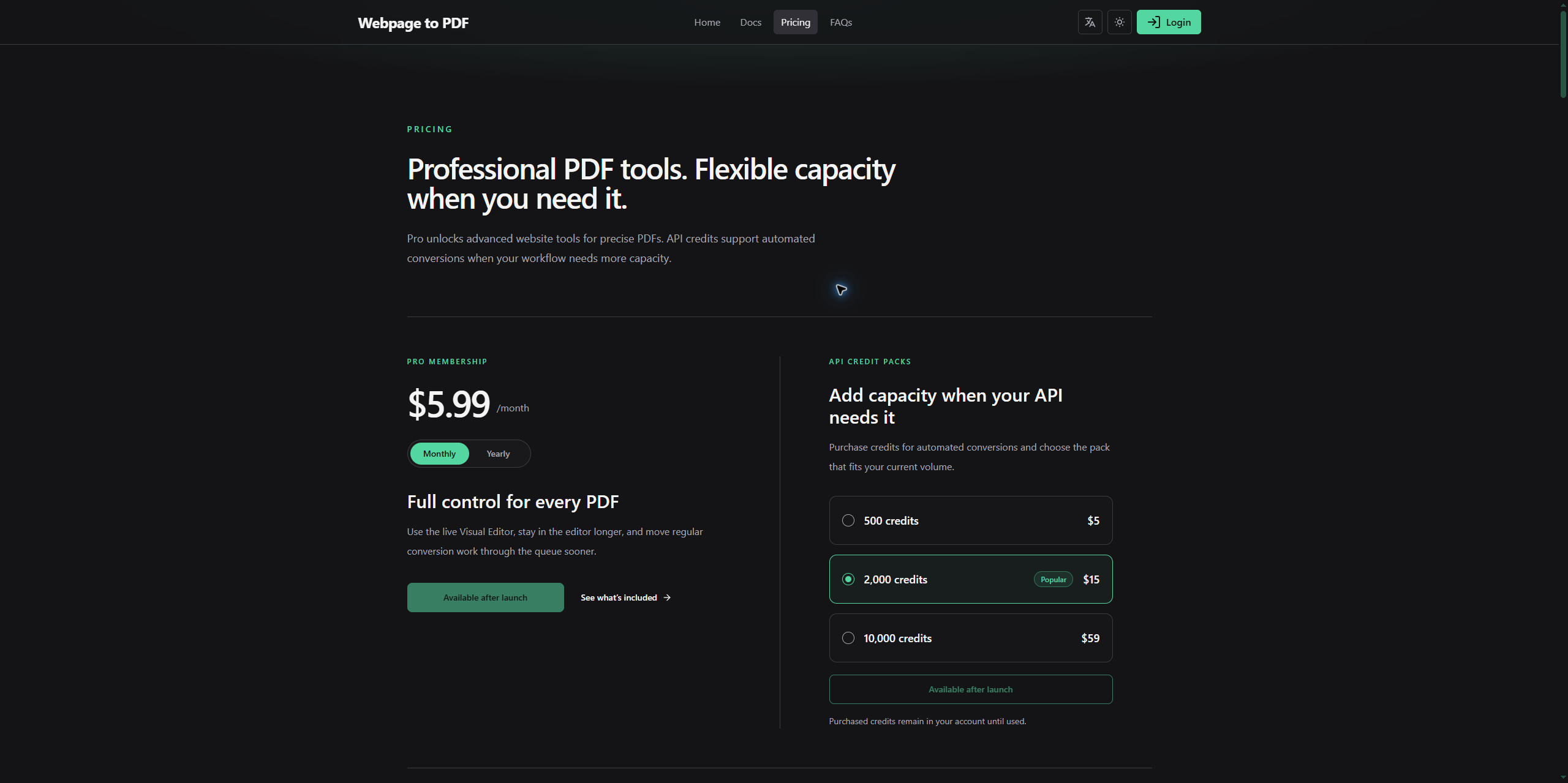
接著直接請 AI 依產品定義建立 Pricing 頁面。以下是我的提示詞:
根據
config/products.ts中現有的產品設定,建立獨立的 Pricing 頁面,清楚呈現 Pro 會員方案、點數包,以及免費使用者與會員的完整使用權益差異。並依既有 API 功能開關,決定是否顯示 API 使用權益和點數加值內容。
經過幾輪調整後的畫面如下:
串接使用權益與權限系統
完成上一節設定後,系統已能依使用者註冊、購買等行為,自動分配對應角色與使用權益。
不過,目前只完成分配,還沒處理額度扣除與權限檢查。這兩項在 SaaS 產品很常見,尤其涉及付費功能、使用次數和 API 呼叫額度時,幾乎都會用到。
這一節延續前面的設定,實作額度扣除和權限檢查。
額度扣除
額度扣除主要用於 Numeric 型別的使用權益。使用者使用某項功能時,需從現有額度扣除對應數量。
常見情境是點數。例如每使用一次功能,就扣除一定點數,剩餘額度也會減少。
目前專案定義了兩種 Numeric 額度:web_conversion_seconds 和 api_conversion_credits。
web_conversion_seconds表示網頁轉換時間,使用網頁轉換功能時,依實際使用情況扣除對應時間額度。api_conversion_credits表示 API 呼叫點數,透過 API 執行轉換時,會消耗對應點數。
Saavo 預設已在 repo 層實作額度扣除方法 consumeQuotaBySubject,可依使用者與使用權益/能力扣除指定額度,呼叫端不必知道額度分散在哪幾筆 entitlement 記錄。
前面提過,entitlements 記錄採增量模型,代表同一位使用者可能同時有多筆額度記錄,而且彼此可能有優先順序。如果自行實作扣除邏輯,需要特別注意。一般仍建議使用 Saavo 內建的 consumeQuotaBySubject。
這是 repo 層方法,因此你需要在 service 層實作對應業務邏輯。呼叫方式如下:
const result = await userEntitlementCapabilityRepo.consumeQuotaBySubject(
    ctx,
    {
        subject: subjectOfUser(userId),
        capabilityKey: 'web.convert',
        amount: 35,
        eventType: 'consume',
        reason: 'Webpage conversion',
        metadata: { taskId },
    },
    additionalStatements,
);
參數說明:
| 參數 | 意義 |
|---|---|
subject | 扣除額度的主體,例如 { type: 'user', id: '7' } |
capabilityKey | 依能力尋找額度,例如 web.convert |
entitlementKey | 依使用權益尋找額度 |
amount | 要求扣除的數量,必須是大於 0 的安全整數 |
eventType | 額度異動記錄類型,例如 consume |
reason | 扣除原因 |
metadata | 附加資料,例如 taskId |
additionalStatements | 需要與扣除操作一起以原子方式執行的其他 D1 陳述式 |
capabilityKey 和 entitlementKey 至少要傳入一個,同時傳入時必須同時符合。
函式的核心邏輯如下:
- 找出該使用者所有有效的 Numeric 額度。
- 依 priority DESC, id ASC 順序扣除。
- 一筆額度不足時,繼續扣除下一筆。
- 同步寫入 capability_quota_event 額度異動記錄。
- 透過一次 D1 batch,執行額度異動記錄、額度更新及附加陳述式。
函式回傳結果如下:
{
    requested: 35, // 預期扣除
    consumed: 30,  // 實際扣除
    remaining: 0,  // 扣除後剩餘
    debt: 5,       // 無法扣除的部分
}
剩餘額度不足時,系統不會拋出「額度不足」例外,而是先扣除所有剩餘額度,再透過 debt 回傳仍短缺的數量。
只有參數不合法、資料庫操作失敗,或額度更新與異動記錄不一致時,才會拋出例外。
權限檢查
權限檢查本身不複雜,但不同業務情境需要檢查的內容不同。常見項目包括登入狀態、使用者角色、使用權益、剩餘額度,以及特定能力。
多數情況下,權限設計盡量保持簡單:
- 只有註冊使用者能使用的功能,檢查登入狀態。
- 管理後台等固定權限,檢查使用者角色。
- 付費功能,檢查使用者是否具有對應使用權益。
- 如果多個角色或使用權益都能提供同一項業務能力,可以進一步檢查能力。
- 有使用次數、點數或時間限制的功能,還需在 Service 層檢查並扣除額度。
在這個案例中,Quick Convert 和 Custom 對所有使用者開放。Visual Editor 要求先登入,註冊使用者可體驗一次,後續則需要 Pro 使用權益。API 首版暫不開放,日後啟用時,再依使用者持有的點數額度決定是否允許呼叫。
實作方式很簡單,只需在 API 檢查使用者角色與使用權益,例如:
import { authenticatedGuard } from '@/core/services/auth/guards/authenticated';
import type { Ctx } from '@/types';

export function createVisualAuthenticationMiddleware() {
    return async (c: Ctx, next: () => Promise<void>) => {
        const authenticated = authenticatedGuard(c);

        if (!authenticated.success) {
            return c.json(
                authenticated,
                c.get('saasAuthContext') ? 403 : 401,
            );
        }

        await next();
    };
}
以上中介軟體只負責攔截匿名存取。通過登入檢查後,仍需在 Service 層判斷使用者是否還有體驗次數,或是否持有 Pro 使用權益。也可以將登入檢查放在對應的 API 路由入口,效果相同。
如需檢查使用者是否具有某個角色,可以採用以下方式,例如只允許管理員存取特定 API:
import { authz } from '@/authz';
import { gResultCode } from '@/errors';
import type { Ctx } from '@/types';

async function requireAdmin(c: Ctx, next: () => Promise<void>) {
    if (!await authz.hasRole(c, 'admin')) {
        return c.json({
            success: false,
            code: gResultCode.authRoleDenied,
            error: 'api.auth.roleDenied',
            retryable: false,
        }, 403);
    }

    await next();
}
專案也支援檢查角色提供的特定能力:
const allowed = await authz.hasRoleCapability(
    c,
    'admin.user.manage',
);
Saavo 提供許多類似方法,統一放在 authz 物件中,可以依需求選用。如果仍無法滿足需求,也可以請 AI 依這個邏輯實作自己的檢查函式。
本篇檢查
完成本篇後,應分別檢查匿名、註冊和 Pro 使用者的權限與每日額度,確認 Visual Editor 的首次體驗限制生效。