设计套餐与接入权益
配置免费和 Pro 套餐、用户额度、价格页面及权限校验。
上一篇已经迁移核心转换功能。这一篇设计免费和 Pro 用户的使用规则,将套餐、权益分配、额度扣减和权限校验串起来;真实支付在下一篇接入。
付费方案和价格页面
WebpageToPDF 一共有三种核心功能。Quick Convert 和 Custom 免费开放;Visual Editor 要求用户先登录,可以免费体验一次,之后需要开通 Pro。我的想法是创建一个付费会员,分为每月 5.99 美元和每年 49.99 美元两种方案。
API 转换不属于首版功能,不过这里会提前把它的计费和权益设计好,后续启用时不需要再调整整个产品模型。首版暂时隐藏 API 入口和积分包。这里预先定义会员每月重置的 API 额度规则,等 API 正式开放后即可按规则使用,月度赠送额度不跨月累积。整体权益如下:
| 项目 | Free | Pro | API 充值包(后续开放) |
|---|---|---|---|
| Quick / Custom 网页转换 | 基础额度 | 高额度 | 不影响 |
| Visual Editor | 注册后体验一次 | 完整使用 | 不影响 |
| 所有网页设置 | ✓ | ✓ | 不影响 |
| API Key | 试用 Key | ✓ | ✓ |
| API 赠送额度 | 一次性试用额度 | 每月自动发放 | 购买后增加 |
| API 并发数 | 1 | 1 | 默认不提高 |
| 优先处理 | ✓ | 可根据 API 套餐决定 | |
| 余额重置 | 试用额度不重置 | 月度赠送额度每月重置 | 充值额度不重置 |
| 取消会员后 | 保留账户 | 失去 Pro 网页权益 | 已购买额度继续使用 |
这是我和 AI 讨论后的结果,以后可能还会调整,但是大致上不会偏离这个方向。
确认了基本商业结构,下面就要拆解这些权益,分别对应到不同的套餐和价格。目前我准备从两方面来限制:
- 其一,使用用户角色,默认免费用户只能使用一定次数的免费功能,可以引导用户注册,当然不是为了节省资源,而是为了方便统计和限制。
- 其二,使用用户权益,我将核心额度分为 Session 的使用时长和 API 的转换次数。
网页上的权限使用用户角色做限制,免费用户接口的访问次数使用 IP/Anonymous ID 来做限制,网页转换还会按 Session 的使用时长限制每日额度:匿名用户单独计量,登录用户通过权益配置每日重置额度。API 访问接口是独立的,只受积分额度限制,会员用户每月重置积分。
定义能力与权益
理清关系后,在 config/capability.ts 中追加两个新能力:
web: {
    convert: {
        type: CapabilityType.Numeric,
        description: {
            value: 'Web conversion session time measured in seconds',
            key: 'components.billing.entitlements.webConversionSeconds.capabilityDescription',
        },
    },
},

api: {
    convert: {
        type: CapabilityType.Numeric,
        description: {
            value: 'Credits available for successful API conversions',
            key: 'components.billing.entitlements.apiConversionCredits.capabilityDescription',
        },
    },
},
根据这两种能力,我估算了一下,按照角色划分:
web.convert:
| 用户等级 | 注册用户基础额度 | 本级额度 | 最终每日额度 | 按 30 秒折算 |
|---|---|---|---|---|
| 匿名用户 | — | 独立限额 600 秒 | 600 秒 / 10 分钟 | 约 20 次 |
| 注册用户 | 1,800 秒 | 无额外额度 | 1,800 秒 / 30 分钟 | 约 60 次 |
| Pro 用户 | 1,800 秒 | 额外增加 1,800 秒 | 3,600 秒 / 60 分钟 | 约 120 次 |
这里将匿名限额和登录用户权益分开处理。匿名用户的 600 秒独立统计,不计入登录用户的权益;用户注册后直接获得每日 1,800 秒。Pro 用户保留这份注册权益,再叠加每日 1,800 秒的会员权益,总计 3,600 秒。取消会员并失去 Pro 权益后,只移除会员增加的部分,注册权益仍然保留。后面的配置示例按这个规则设置。
api.convert:
| 用户/产品 | 本级增加的 API 积分 | 重置方式 |
|---|---|---|
| 匿名用户 | 0 | — |
| 注册用户 | +10 | 注册时一次性赠送 |
| Pro 月付 | +500 | 每月重置 |
| Pro 年付 | +500 | 每月重置 |
| 500 积分包 | +500 | 永久有效 |
| 2,000 积分包 | +2,000 | 永久有效 |
| 10,000 积分包 | +10,000 | 永久有效 |
roles 使用默认定义就可以,不需要修改。那接下来就是修改 entitlements.ts 文件,根据上面的表格,创建对应的权益定义。
export const websiteEntitlementDefinitions = {
  web_conversion_seconds: {
    name: {
      value: 'Web conversion time',
      key: 'components.billing.entitlements.webConversionSeconds.name',
    },
    description: {
      value: 'Daily web conversion allowance measured in browser session seconds.',
      key: 'components.billing.entitlements.webConversionSeconds.description',
    },
    capabilities: [
      'web.convert',
    ],
  },
  api_conversion_credits: {
    name: {
      value: 'API conversion credits',
      key: 'components.billing.entitlements.apiConversionCredits.name',
    },
    description: {
      value: 'Credits consumed by successful API conversions.',
      key: 'components.billing.entitlements.apiConversionCredits.description',
    },
    capabilities: [
      'api.convert',
    ],
  },
} as const satisfies WebsiteEntitlementDefinitionsInput;
配置产品与套餐
下面保留完整配置,便于对照月付、年付和积分包的差异。API 积分包暂不开放,因此对应套餐保持 disabled: true。
接着就是定义产品,修改 products.ts 文件,根据上面的表格,创建对应的套餐、价格和权益。
export const websiteProductDefinitions = {
pro: {
name: {
value: 'Webpage to PDF Pro',
key: 'components.billing.product.name',
},
description: {
value: 'A full 60 minutes of webpage conversion time every day—twice the free account allowance.',
key: 'components.billing.product.description',
},
plans: {
license: {
type: 'recurring',
interval: 'month',
intervalCount: 1,
priceId: 'price_xxxxxxxxxxxxxxxxxxxxx',
allowRepurchase: false,
disabled: false,
salePrice: '$5.99',
billingLabel: {
value: '/month',
key: 'components.billing.period.month',
},
title: {
value: 'Pro',
key: 'components.billing.pro.name',
},
description: {
value: 'Double the daily conversion time of a free account to a full 60 minutes.',
key: 'components.billing.pro.planDescription',
},
features: [
{
value: 'A full 60 minutes of webpage conversion time per day',
key: 'components.billing.pro.features.dailyConversionTime',
},
{
value: 'Twice the free account daily allowance',
key: 'components.billing.pro.features.doubleAllowance',
},
{
value: 'Quick, Custom, and Visual conversion included',
key: 'components.billing.pro.features.allModes',
},
{
value: 'Failed conversions do not use conversion time',
key: 'components.billing.pro.features.failedJobs',
},
],
access: {
roles: ['premium'],
entitlements: [
{
target: 'web_conversion_seconds',
config: {
kind: 'numeric',
unitLimit: 1800,
scaling: 'fixed_amount',
reset: {
alignment: 'calendar',
interval: 'day',
count: 1,
},
rollover: false,
quotaUsedResetMode: 'clear',
},
},
{
target: 'api_conversion_credits',
config: {
kind: 'numeric',
unitLimit: 500,
scaling: 'fixed_amount',
reset: {
alignment: 'calendar',
interval: 'month',
count: 1,
},
rollover: false,
quotaUsedResetMode: 'clear',
},
},
],
},
default: true,
recommended: true,
},
yearly: {
type: 'recurring',
interval: 'year',
intervalCount: 1,
priceId: 'price_xxxxxxxxxxxxxxxxxxxxy',
allowRepurchase: false,
disabled: false,
salePrice: '$49.99',
billingLabel: {
value: '/year',
key: 'components.billing.period.year',
},
valueHint: {
value: 'Save 30% with annual billing',
key: 'components.billing.yearlyValueHint',
},
title: {
value: 'Pro',
key: 'components.billing.pro.name',
},
description: {
value: 'Double the daily conversion time of a free account to a full 60 minutes.',
key: 'components.billing.pro.planDescription',
},
features: [
{
value: 'A full 60 minutes of webpage conversion time per day',
key: 'components.billing.pro.features.dailyConversionTime',
},
{
value: 'Twice the free account daily allowance',
key: 'components.billing.pro.features.doubleAllowance',
},
{
value: 'Quick, Custom, and Visual conversion included',
key: 'components.billing.pro.features.allModes',
},
{
value: 'Failed conversions do not use conversion time',
key: 'components.billing.pro.features.failedJobs',
},
],
access: {
roles: ['premium'],
entitlements: [
{
target: 'web_conversion_seconds',
config: {
kind: 'numeric',
unitLimit: 1800,
scaling: 'fixed_amount',
reset: {
alignment: 'calendar',
interval: 'day',
count: 1,
},
rollover: false,
quotaUsedResetMode: 'clear',
},
},
{
target: 'api_conversion_credits',
config: {
kind: 'numeric',
unitLimit: 500,
scaling: 'fixed_amount',
reset: {
alignment: 'calendar',
interval: 'month',
count: 1,
},
rollover: false,
quotaUsedResetMode: 'clear',
},
},
],
},
recommended: true,
},
},
},
api_credits: {
name: {
value: 'API conversion credits',
key: 'components.billing.api.productName',
},
description: {
value: 'One-time credit packs for additional successful API conversions.',
key: 'components.billing.api.productDescription',
},
plans: {
credits_500: {
type: 'one-time',
priceId: 'price_xxxxxxxxxxxxxxxxxxxxz1',
allowRepurchase: true,
disabled: true,
salePrice: '$5',
access: {
entitlements: [
{
target: 'api_conversion_credits',
config: {
kind: 'numeric',
unitLimit: 500,
scaling: 'per_unit',
},
},
],
},
title: {
value: '500 credits',
key: 'components.billing.api.packs.credits500.name',
},
description: {
value: 'For prototypes and occasional API jobs.',
key: 'components.billing.api.packs.credits500.description',
},
features: [{
value: '500 successful API conversions',
key: 'components.billing.api.packs.credits500.feature',
}],
},
credits_2000: {
type: 'one-time',
priceId: 'price_xxxxxxxxxxxxxxxxxxxxz2',
allowRepurchase: true,
disabled: true,
recommended: true,
salePrice: '$15',
access: {
entitlements: [
{
target: 'api_conversion_credits',
config: {
kind: 'numeric',
unitLimit: 2_000,
scaling: 'per_unit',
},
},
],
},
title: {
value: '2,000 credits',
key: 'components.billing.api.packs.credits2000.name',
},
description: {
value: 'For regular integrations and growing workloads.',
key: 'components.billing.api.packs.credits2000.description',
},
features: [{
value: '2,000 successful API conversions',
key: 'components.billing.api.packs.credits2000.feature',
}],
},
credits_10000: {
type: 'one-time',
priceId: 'price_xxxxxxxxxxxxxxxxxxxxz3',
allowRepurchase: true,
disabled: true,
salePrice: '$59',
access: {
entitlements: [
{
target: 'api_conversion_credits',
config: {
kind: 'numeric',
unitLimit: 10_000,
scaling: 'per_unit',
},
},
],
},
title: {
value: '10,000 credits',
key: 'components.billing.api.packs.credits10000.name',
},
description: {
value: 'For production services with sustained demand.',
key: 'components.billing.api.packs.credits10000.description',
},
features: [{
value: '10,000 successful API conversions',
key: 'components.billing.api.packs.credits10000.feature',
}],
},
},
},
} as const satisfies Record<string, ProductConfig>;配置匿名限额与注册权益
上面这些就是付费模型开通的权限和权益了,但是这还不够,因为还有注册用户和匿名用户的权益需要定义。
匿名用户没有 userId,不能直接使用用户角色和权益进行约束。实际项目中可以结合 IP 和 Saavo 提供的 Anonymous ID 限制调用频率和使用额度。Anonymous ID 只能用来辅助识别浏览器,不能作为可靠的用户身份;具体采用多严格的限制,需要根据产品成本和滥用情况决定,本教程不再展开实现细节。
对于注册用户,我初步的想法是设置用户角色为 register,同时提供注册用户的每日额度和一次性 API 积分。实现方式也很简单,打开 src/core/reaction/events/signup.ts 文件,在注册事件中增加对应逻辑。该文件的默认代码如下:
export const UserSignupEvent = defineEvent<
    'user_signed_up',
    UserSignupEventData
>({
    type: 'user_signed_up',
    trigger: (_ctx, event) => {
        return [
            ...(event.payload.roles?.length ? [GrantRoleCommand.create({
                key: 'init_signup_user_role',
                payload: {
                    subject: event.subject,
                    sourceType: event.payload.sourceType,
                    sourceKey: event.payload.sourceKey,
                    roles: event.payload.roles,
                },
            })] : []),

            ...(event.payload.register ? [SendEmailCommand.create({
                key: 'send_registration_email',
                payload: {
                    templateKind: 'register',
                    ...event.payload.register,
                },
            })] : []),
        ];
    },
});
这段代码比较直观。当用户触发 signup 事件后,系统会依次执行初始化用户角色和发送注册邮件两个命令。
现在我们希望用户注册成功后,再额外赠送一些权益和 API 积分,只需要在这里加入对应的命令即可。例如:
GrantEntitlementCommand.create({
    key: 'init_signup_user_entitlements',
    payload: {
        subject: event.subject,
        sourceType: event.payload.sourceType,
        sourceKey: event.payload.sourceKey,
        entitlements: [
            {
                target: 'web_conversion_seconds',
                config: {
                    kind: 'numeric',
                    unitLimit: 1_800,
                    scaling: 'fixed_amount',
                    reset: {
                        alignment: 'calendar',
                        interval: 'day',
                        count: 1,
                    },
                    rollover: false,
                    quotaUsedResetMode: 'clear',
                    description: 'Registered user daily web conversion allowance',
                },
            },
            {
                target: 'api_conversion_credits',
                config: {
                    kind: 'numeric',
                    unitLimit: 10,
                    scaling: 'fixed_amount',
                    description: 'One-time API credits for registration',
                },
            },
        ],
    },
}),
这样,注册用户的权益和 API 积分赠送就配置完成了,如果你怕被用户随意输入邮箱注册刷取资源,可以将这部分逻辑放到邮箱验证(user_email_verified)事件中实现。
注意
记得把 affiliate.ts 配置文件也改了,它内部使用了 entitlements.ts 文件中的权益定义。
到这里,我们已经完成了角色和权益的定义,以及对应的自动分配规则。后续用户注册或购买产品后,系统会根据配置自动完成角色和权益分配,并在数据库中生成对应的记录,不需要再手动处理。
创建价格页面
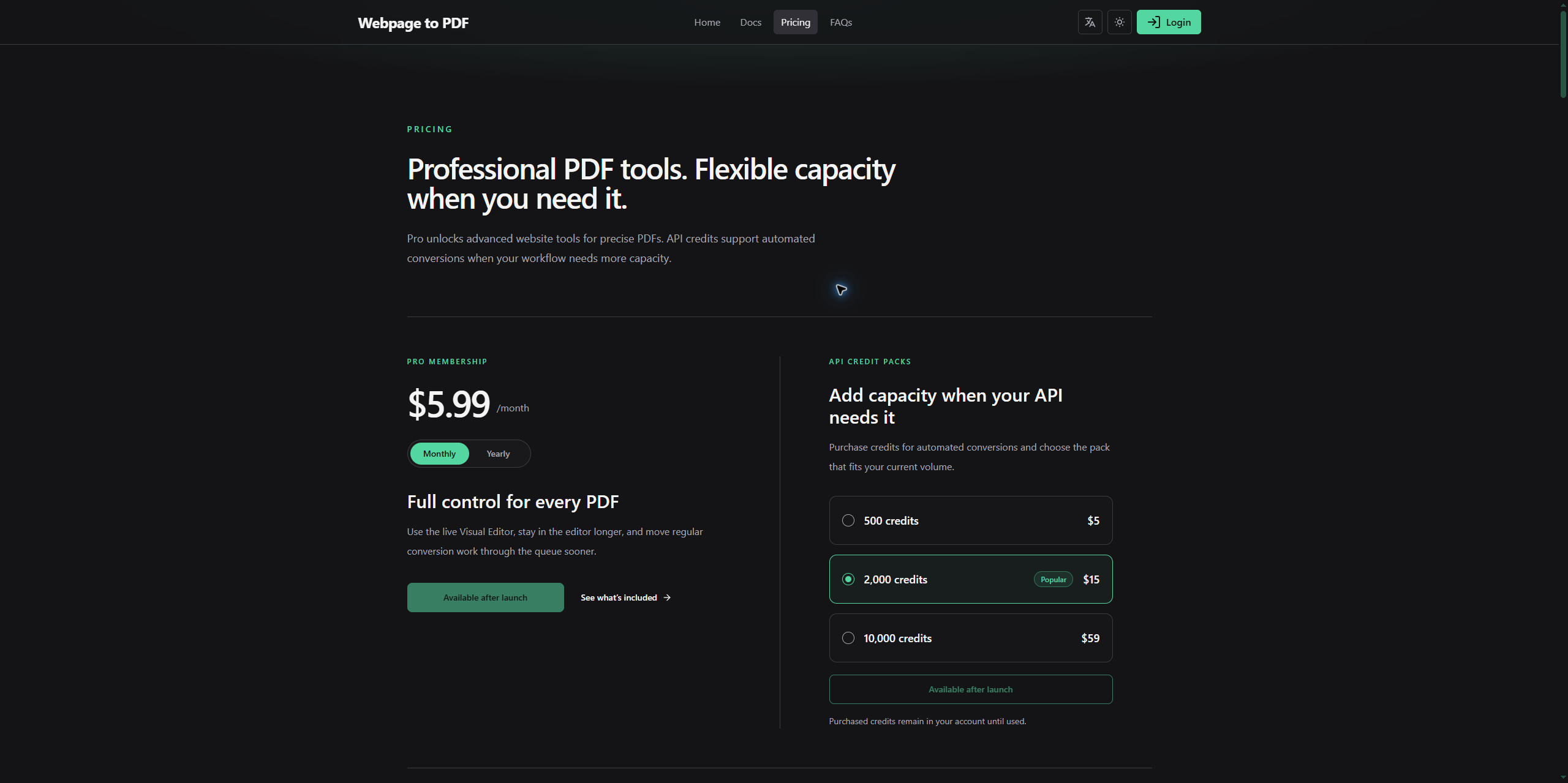
接下来直接让 AI 帮我们搭建 Pricing 页面,根据产品定义生成对应的页面代码。下面是我的提示词:
基于
config/products.ts中现有的产品配置,创建独立的 Pricing 页面,清晰展示 Pro 会员方案、积分包及免费用户与会员的完整权益差异,并根据已有的 API 功能开关决定是否显示 API 权益和积分充值内容。
经过几轮调整后的截图如下:
接入权益和权限系统
经过上一节的配置,系统已经可以根据用户的注册、购买等行为自动分配对应的角色和权益。
不过目前我们只完成了分配,还没有处理额度扣减和权限校验。这两个功能在 SaaS 产品中都很常见,尤其是涉及付费功能、使用次数和 API 调用额度时,基本都会用到。
这一节继续在前面配置的基础上,实现额度扣减和权限校验。
额度扣减
额度扣减主要针对 Numeric 类型的权益。当用户使用某项功能时,需要从当前拥有的权益额度中扣除对应的数量。
比较常见的场景就是积分。例如用户每使用一次某项功能,就扣除一定数量的积分,剩余额度也会随之减少。
目前项目中定义了两种 Numeric 类型的额度,分别是 web_conversion_seconds 和 api_conversion_credits。
web_conversion_seconds表示网页转换时长。用户使用网页转换功能时,会根据实际使用情况扣除对应的时长额度。api_conversion_credits表示 API 调用积分。用户通过 API 执行转换时,会消耗对应数量的积分。
Saavo 默认已经在 repo 层实现了额度扣减功能,名称叫做 consumeQuotaBySubject,它可以按用户和权益/能力扣除指定额度,而不要求调用者知道额度分布在哪几条 entitlement 记录中。
我在前面已经说过了 entitlements 中的记录是增量模型,这意味着一个用户可能同时存在多条额度记录,甚至它们之间还会存在优先级的问题,所以如果你想自行实现额度扣减,需要注意这一问题,默认情况下还是推荐使用 Saavo 自带的 consumeQuotaBySubject 方法。
这是一个 repo 层方法,所以需要你自行在 service 层实现对应的业务逻辑。具体调用方法如下:
const result = await userEntitlementCapabilityRepo.consumeQuotaBySubject(
    ctx,
    {
        subject: subjectOfUser(userId),
        capabilityKey: 'web.convert',
        amount: 35,
        eventType: 'consume',
        reason: 'Webpage conversion',
        metadata: { taskId },
    },
    additionalStatements,
);
这个方法的参数如下:
| 参数 | 含义 |
|---|---|
subject | 被扣费主体,例如 { type: 'user', id: '7' } |
capabilityKey | 按能力查找额度,例如 web.convert |
entitlementKey | 按权益查找额度 |
amount | 请求扣除数量,必须是大于 0 的安全整数 |
eventType | 额度流水类型,例如 consume |
reason | 扣除原因 |
metadata | 附加数据,例如 taskId |
additionalStatements | 需要和扣费一起原子执行的其他 D1 语句 |
capabilityKey 和 entitlementKey 至少传一个,同时传入时必须同时匹配。
函数核心逻辑如下:
- 找到该用户所有有效的 Numeric 类型的额度。
- 按 priority DESC, id ASC 顺序扣除。
- 一条额度不够时继续扣下一条。
- 同步写入 capability_quota_event 额度流水。
- 通过一次 D1 batch 执行额度流水、额度更新及附加语句。
这个函数返回的结果如下:
{
    requested: 35, // 希望扣除
    consumed: 30,  // 实际扣除
    remaining: 0,  // 扣除后剩余
    debt: 5,       // 未能扣除的部分
}
当剩余额度不足时,系统不会抛出“额度不足”异常,而是先扣除全部剩余额度,再通过 debt 返回仍然缺少的额度。
只有在参数非法、数据库操作失败,或者额度更新与流水记录不一致时,才会抛出异常。
权限校验
权限校验本身并不复杂,但不同业务场景需要检查的内容不一样。常见的校验包括登录状态、用户角色、用户权益、剩余额度,以及某项具体能力。
大多数情况下,权限设计尽量保持简单即可:
- 仅允许注册用户使用的功能,检查登录状态。
- 后台管理等固定权限,检查用户角色。
- 付费功能,检查用户是否拥有对应权益。
- 如果多个角色或权益都可以提供同一种业务能力,可以进一步检查能力。
- 有使用次数、积分或时长限制的功能,还需要在 Service 层检查并扣除额度。
在这个案例中,Quick Convert 和 Custom 对所有用户开放。Visual Editor 要求用户先登录,注册用户可以体验一次,后续使用则需要 Pro 权益。API 首版暂不开放,等后续启用时,再根据用户拥有的积分额度决定是否允许调用。
想要实现这个功能,也很简单,只需要在 API 接口中校验用户角色和权益即可。例如:
import { authenticatedGuard } from '@/core/services/auth/guards/authenticated';
import type { Ctx } from '@/types';

export function createVisualAuthenticationMiddleware() {
    return async (c: Ctx, next: () => Promise<void>) => {
        const authenticated = authenticatedGuard(c);

        if (!authenticated.success) {
            return c.json(
                authenticated,
                c.get('saasAuthContext') ? 403 : 401,
            );
        }

        await next();
    };
}
上面的中间件只负责拦截匿名访问。通过登录校验后,还需要在 Service 层判断用户是否仍有体验次数,或者是否拥有 Pro 权益。你也可以把登录校验写在对应的 API 路由入口,效果是一样的。
如果你需要检测用户是否为某个角色,可以使用下面的方案,例如只允许管理员访问某个接口:
import { authz } from '@/authz';
import { gResultCode } from '@/errors';
import type { Ctx } from '@/types';

async function requireAdmin(c: Ctx, next: () => Promise<void>) {
    if (!await authz.hasRole(c, 'admin')) {
        return c.json({
            success: false,
            code: gResultCode.authRoleDenied,
            error: 'api.auth.roleDenied',
            retryable: false,
        }, 403);
    }

    await next();
}
项目同时也支持检查角色提供的具体能力:
const allowed = await authz.hasRoleCapability(
    c,
    'admin.user.manage',
);
Saavo 提供了很多类似的方法,统一放在了 authz 对象中,你可以根据需要选择合适的方法。如果这些方法仍然无法满足你的需要,你完全可以让 AI 按照这样的逻辑实现自己的校验函数。
本篇检查
完成这一篇后,应分别检查匿名用户、注册用户和 Pro 用户的权限与每日额度,确认 Visual Editor 的首次体验限制生效。